 WidgetCraftGet the app
Winter · To-do list · 4 × 2 widget
Winter to-do list widget
A winter to-do list widget keeps today's tasks on your home screen with boxes you can tick. Icy blues, snow white and silver. This page gives the exact colors, type settings and layers, with a preview drawn from the same values.
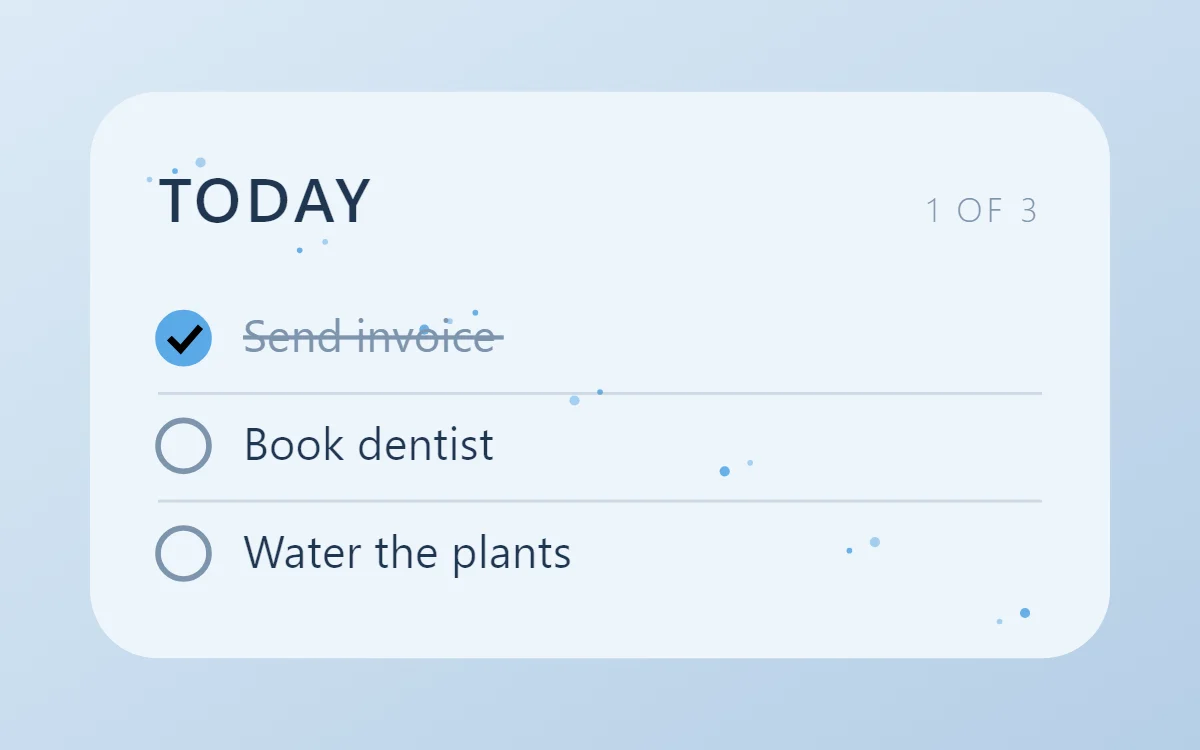
What a winter to-do list widget shows
A to-do widget works when it is short. Three tasks, a clear title and a box to tap are enough; a long list belongs in an app.
WidgetCraft stores local tasks on the phone, which is a free source and needs no account or permission. Tapping a row can tick the task from the home screen.
How the winter style shapes it
Winter widgets are cool and quiet: snow white, ice blue and slate, with thin type and a crisp, frosty feel.
- Lists: Thin dividers and round outline checkboxes.
- Text: Use light-weight capitals in midnight blue.
Winter to-do list widget recipe
| Layer | Settings |
|---|---|
| Canvas | 360 × 200, background #EEF5FB, corner radius 24 |
| Text | title "Today", built-in Sans, size 22, color #1F3550 |
| Text | count such as "1 of 3", size 12, color #7E94AD, right aligned |
| List | local tasks, 3 rows, row height 38, text size 16 in #1F3550 |
| Checkbox | 18 × 18, radius 9, outline #7E94AD; done state filled #5AA9E6 |
| Done rows | text #7E94AD with strikethrough |
| Ornament | sixteen small glacier-blue dots scattered across the background as snow |
| Font | built-in Sans |
| Home screen size | 4 × 2 cells |
Winter color palette
- Snow
#EEF5FBBackground - Ice
#D9E8F5Surface and tracks - Midnight blue
#1F3550Text - Frost grey
#7E94ADLabels - Glacier
#5AA9E6Accent
How to make a winter to-do list widget in WidgetCraft
- Create a widget and open Canvas. Set the size to 360 × 200, the background to #EEF5FB and the corner radius to 24.
- Add a Text layer for the title "Today" at size 22 in #1F3550.
- Tap Add and choose List. In Data, choose your local task list and limit it to three rows.
- Set the row text to size 16 in #1F3550 and the checkbox to 18 × 18 with radius 9.
- Style finished rows in #7E94AD and set the tick color to #5AA9E6. In Tap, set a row tap to tick the task.
- Add the winter ornament with Shape layers and move them below the other layers in Layers: sixteen small glacier-blue dots scattered across the background as snow.
- Tap Save, then Add to home screen and resize the widget on your launcher if needed.
Everything in this recipe works in the free version.
Tips for winter to-do list widgets
- Keep everything cool-toned.
- Use thin weights for a crisp feel.
- Limit the list to three or four rows so each stays easy to tap.
- Make finished tasks visibly different: grey text and a strikethrough.
- Tap targets on a widget should be at least 48 dp high.
- Do not add warm colors.
- Do not use heavy fonts.
Questions about the winter to-do list widget
What size is a winter to-do list widget?
It is designed for 4 × 2 home screen cells on a 360 × 200 canvas. You can resize it on the launcher and the design scales in proportion.
Which colors does it use?
Snow (#EEF5FB) for the background, Midnight blue (#1F3550) for the main text, Frost grey (#7E94AD) for labels and Glacier (#5AA9E6) as the accent.
Is it free to make?
Yes. To-do list widgets use free features in WidgetCraft, and the winter styling is free too.
What else is this style called?
People also search for snow to-do list widget, winter aesthetic to-do list widget, icy to-do list widget, frost to-do list widget. They describe the same look as this winter to-do list widget.
More winter widgets
- Winter clock widget
- Winter analog clock widget
- Winter calendar widget
- Winter battery widget
- Winter countdown widget
- Winter photo widget
- Winter quote widget
- Winter music widget
- Winter year progress widget
- Winter step counter widget
- Winter habit tracker widget
- Winter sticky note widget
- Winter world clock widget
- Winter date widget
- Winter home screen setup
- All winter widgets