 WidgetCraftGet the app
Botanical · Countdown · 4 × 2 widget
Botanical countdown widget
A botanical countdown widget counts the days left until a date you choose. Deep greens, leaf photos and natural textures. This page gives the exact colors, type settings and layers, with a preview drawn from the same values.
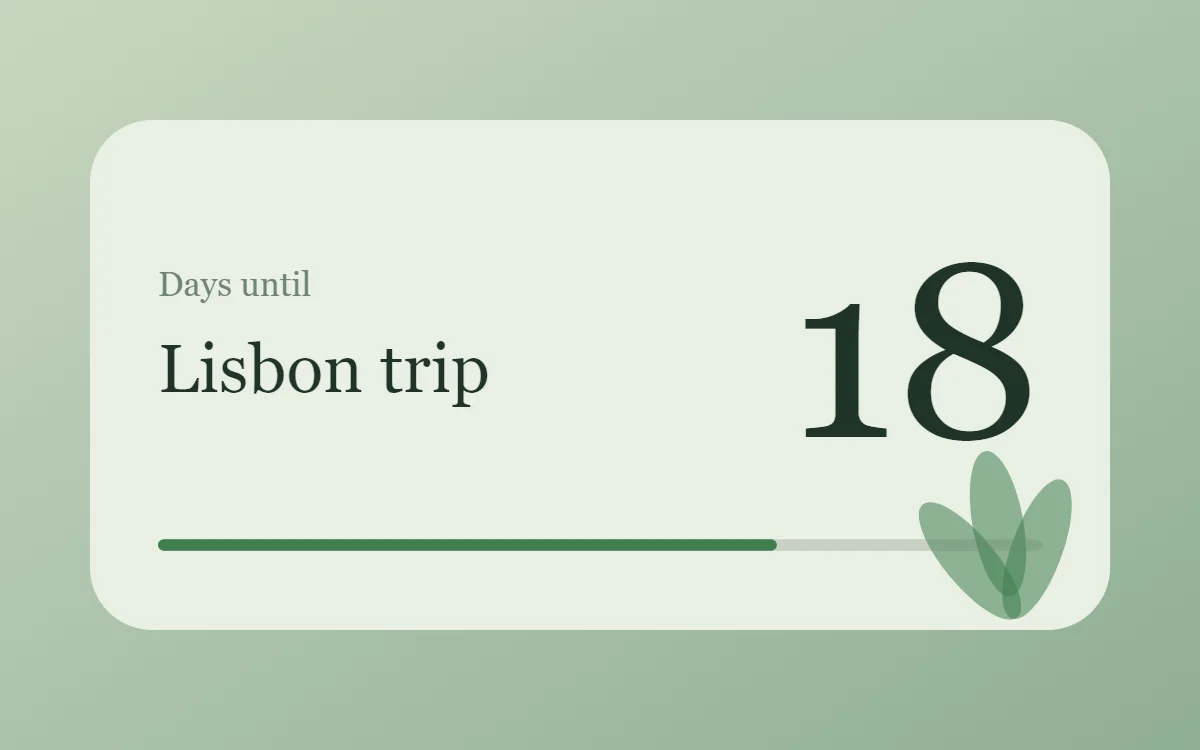
What a botanical countdown widget shows
A countdown widget keeps one date in view: a trip, a birthday, an exam or a launch. The number of days is the hero, the event name gives it meaning and a bar shows how far along you are.
WidgetCraft's countdown layer works from the phone's clock, so it is free, needs no permission and works offline. You pick the target date in the layer's details.
How the botanical style shapes it
Botanical widgets bring plants onto the home screen: deep and soft greens, leaf photographs and a calm serif or sans. They pair naturally with nature wallpapers.
- Numbers: Keep numbers in dark fern with a small moss label.
- Bars and rings: Use thin green bars and rings that suggest growth.
Botanical countdown widget recipe
| Layer | Settings |
|---|---|
| Canvas | 360 × 180, background #E9EFE4, corner radius 22 |
| Layout | split: label and event name on the left, the number right aligned and larger on the right |
| Text | label "Days until", size 12, color #6E8574 |
| Countdown | days remaining, Libre Baskerville, size 76, color #1F3327 |
| Text | event name, size 20, color #1F3327 |
| Progress | a thin 4-point bar, 312 wide, progress #3F7D4E |
| Ornament | three leaf shapes (tall ovals) fanning up from the bottom right corner in fern green at about 55% opacity |
| Font | Libre Baskerville (import the font file), or the built-in Serif |
| Home screen size | 4 × 2 cells |
Botanical color palette
- Leaf mist
#E9EFE4Background - Sage
#D3DFCCSurface and tracks - Deep fern
#1F3327Text - Moss
#6E8574Labels - Fern green
#3F7D4EAccent
How to make a botanical countdown widget in WidgetCraft
- Create a widget and open Canvas. Set the size to 360 × 180, the background to #E9EFE4 and the corner radius to 22.
- Tap Add and choose Countdown. Pick your target date and show days only.
- Set the font to Libre Baskerville, the size to 76 and the color to #1F3327.
- Add a Text label "Days until" at size 12 in #6E8574, and a second Text layer for the event name at size 20.
- Add a Progress layer as a thin 4-point bar in #3F7D4E to show how much of the wait has passed.
- Add the botanical ornament with Shape layers and move them below the other layers in Layers: three leaf shapes (tall ovals) fanning up from the bottom right corner in fern green at about 55% opacity.
- Tap Save, then Add to home screen and resize the widget on your launcher if needed.
Everything in this recipe works in the free version.
Tips for botanical countdown widgets
- Take all colors from one plant photo.
- Mix one large photo with a little text.
- Decide whether today counts; label the number "days left" or "sleeps" so it is not ambiguous.
- Short event names fit best. Two or three words is ideal.
- After the date passes, change the target or the widget will sit at zero.
- Do not use competing bright colors.
- Do not crop leaves into tiny thumbnails.
Questions about the botanical countdown widget
What size is a botanical countdown widget?
It is designed for 4 × 2 home screen cells on a 360 × 180 canvas. You can resize it on the launcher and the design scales in proportion.
Which colors does it use?
Leaf mist (#E9EFE4) for the background, Deep fern (#1F3327) for the main text, Moss (#6E8574) for labels and Fern green (#3F7D4E) as the accent.
Is it free to make?
Yes. Countdown widgets use free features in WidgetCraft, and the botanical styling is free too.
What else is this style called?
People also search for plant countdown widget, nature countdown widget, leaf countdown widget, green aesthetic countdown widget. They describe the same look as this botanical countdown widget.
More botanical widgets
- Botanical clock widget
- Botanical analog clock widget
- Botanical calendar widget
- Botanical battery widget
- Botanical to-do list widget
- Botanical photo widget
- Botanical quote widget
- Botanical music widget
- Botanical year progress widget
- Botanical step counter widget
- Botanical habit tracker widget
- Botanical sticky note widget
- Botanical world clock widget
- Botanical date widget
- Botanical home screen setup
- All botanical widgets