 WidgetCraftGet the app
Cottagecore · To-do list · 4 × 2 widget
Cottagecore to-do list widget
A cottagecore to-do list widget keeps today's tasks on your home screen with boxes you can tick. Countryside calm: sage green, cream, florals and handwritten notes. This page gives the exact colors, type settings and layers, with a preview drawn from the same values.
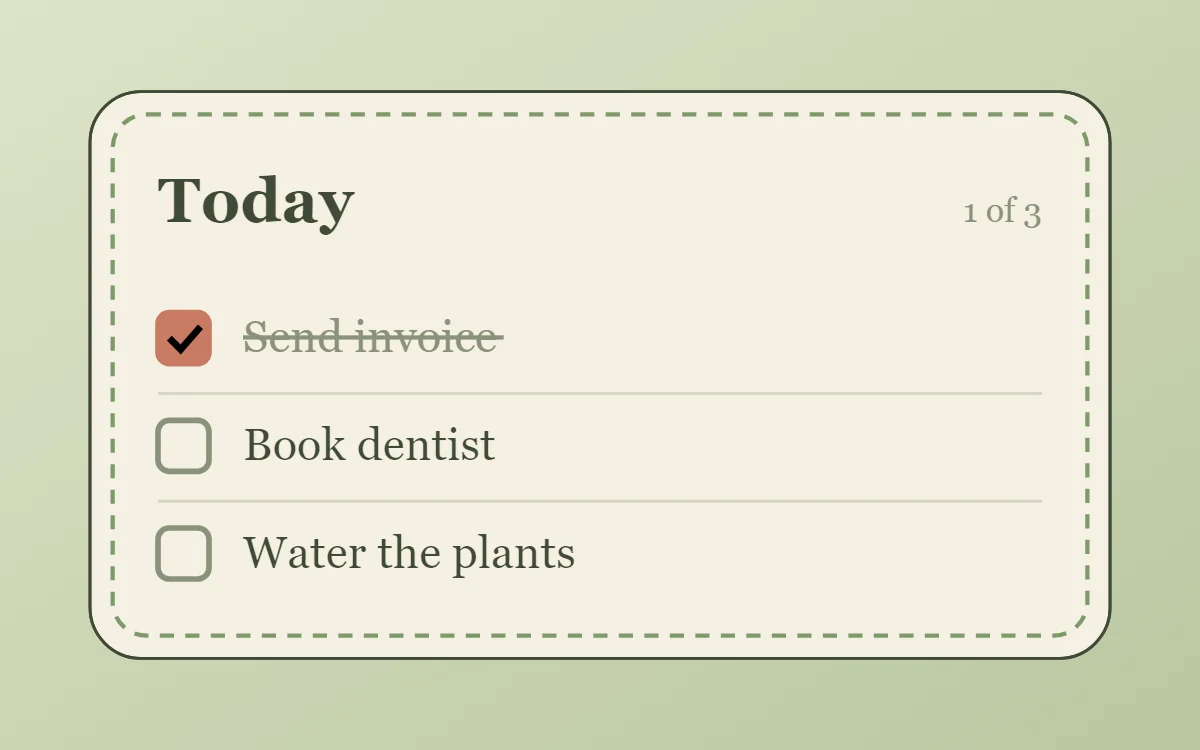
What a cottagecore to-do list widget shows
A to-do widget works when it is short. Three tasks, a clear title and a box to tap are enough; a long list belongs in an app.
WidgetCraft stores local tasks on the phone, which is a free source and needs no account or permission. Tapping a row can tick the task from the home screen.
How the cottagecore style shapes it
Cottagecore widgets feel like a page from a garden journal: sage and cream colors, a serif or handwritten font, pressed-flower photos and gentle rounded frames.
- Lists: Write rows like a shopping note with small dots as markers.
- Text: Use a handwritten or soft serif font in dark green.
Cottagecore to-do list widget recipe
| Layer | Settings |
|---|---|
| Canvas | 360 × 200, background #F4F0E2, corner radius 18, outline 1 pt #3F4A36 |
| Text | title "Today", Caveat, size 22, color #3F4A36 |
| Text | count such as "1 of 3", size 12, color #8A927A, right aligned |
| List | local tasks, 3 rows, row height 38, text size 16 in #3F4A36 |
| Checkbox | 18 × 18, radius 4, outline #8A927A; done state filled #C97B63 |
| Done rows | text #8A927A with strikethrough |
| Ornament | a dashed sage-green outline inset 8 points, like a line of stitching |
| Font | Caveat (import the font file), or the built-in Serif |
| Home screen size | 4 × 2 cells |
Cottagecore color palette
- Cream
#F4F0E2Background - Sage mist
#E3E6CFSurface and tracks - Forest ink
#3F4A36Text - Lichen
#8A927ALabels - Terracotta
#C97B63Accent
How to make a cottagecore to-do list widget in WidgetCraft
- Create a widget and open Canvas. Set the size to 360 × 200, the background to #F4F0E2 and the corner radius to 18. Add a 1-point outline.
- Add a Text layer for the title "Today" at size 22 in #3F4A36.
- Tap Add and choose List. In Data, choose your local task list and limit it to three rows.
- Set the row text to size 16 in #3F4A36 and the checkbox to 18 × 18 with radius 4.
- Style finished rows in #8A927A and set the tick color to #C97B63. In Tap, set a row tap to tick the task.
- Add the cottagecore ornament with Shape layers and move them below the other layers in Layers: a dashed sage-green outline inset 8 points, like a line of stitching.
- Tap Save, then Add to home screen and resize the widget on your launcher if needed.
Everything in this recipe works in the free version.
Tips for cottagecore to-do list widgets
- Use green ink instead of black.
- Add a 1 point outline in a darker sage.
- Limit the list to three or four rows so each stays easy to tap.
- Make finished tasks visibly different: grey text and a strikethrough.
- Tap targets on a widget should be at least 48 dp high.
- Do not use neon or pure white.
- Do not use hard square corners.
Questions about the cottagecore to-do list widget
What size is a cottagecore to-do list widget?
It is designed for 4 × 2 home screen cells on a 360 × 200 canvas. You can resize it on the launcher and the design scales in proportion.
Which colors does it use?
Cream (#F4F0E2) for the background, Forest ink (#3F4A36) for the main text, Lichen (#8A927A) for labels and Terracotta (#C97B63) as the accent.
Is it free to make?
Yes. To-do list widgets use free features in WidgetCraft, and the cottagecore styling is free too.
What else is this style called?
People also search for cottage to-do list widget, floral to-do list widget, countryside to-do list widget. They describe the same look as this cottagecore to-do list widget.
More cottagecore widgets
- Cottagecore clock widget
- Cottagecore analog clock widget
- Cottagecore calendar widget
- Cottagecore battery widget
- Cottagecore countdown widget
- Cottagecore photo widget
- Cottagecore quote widget
- Cottagecore music widget
- Cottagecore year progress widget
- Cottagecore step counter widget
- Cottagecore habit tracker widget
- Cottagecore sticky note widget
- Cottagecore world clock widget
- Cottagecore date widget
- Cottagecore home screen setup
- All cottagecore widgets