 WidgetCraftGet the app
Cyberpunk · Habit tracker · 4 × 2 widget
Cyberpunk habit tracker widget
A cyberpunk habit tracker widget shows today's habits with a ring that fills as you complete them. Yellow and cyan interface panels with angular, technical type. This page gives the exact colors, type settings and layers, with a preview drawn from the same values.
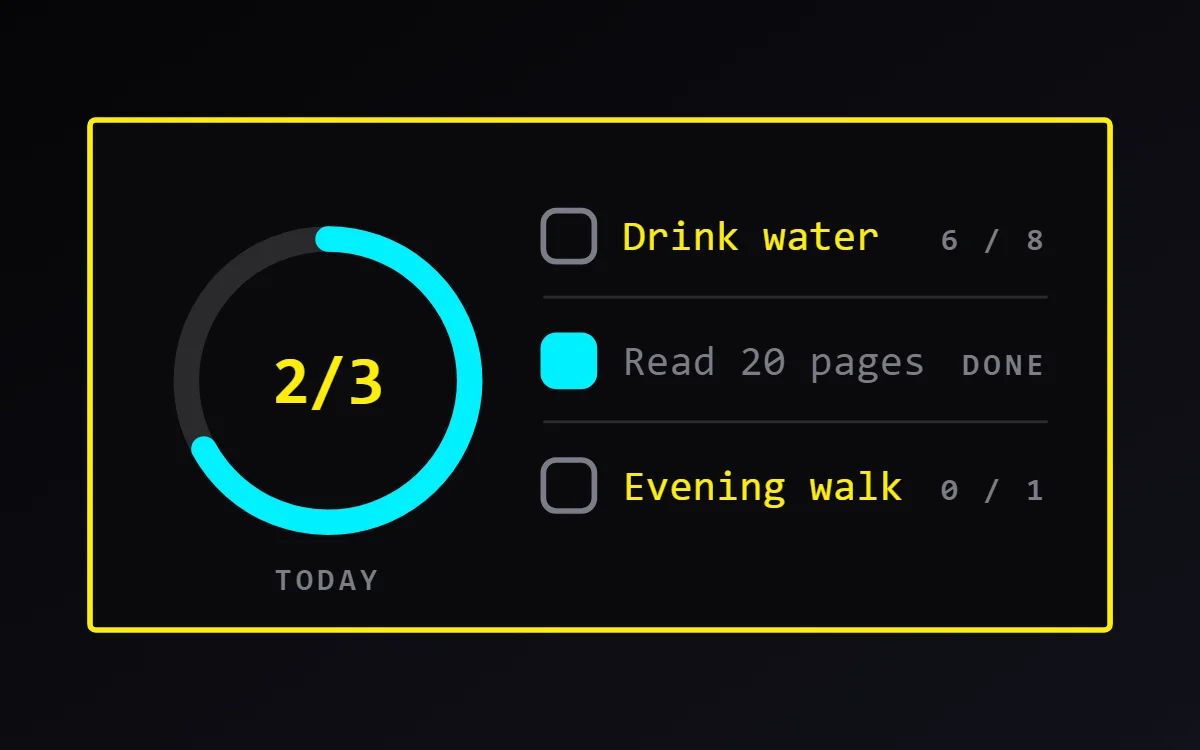
What a cyberpunk habit tracker widget shows
A habit tracker widget keeps a daily routine in view: water, reading, a walk. A ring shows how much of today is done and a short list lets you tick each habit from the home screen.
Habits are stored on the phone in WidgetCraft's Tasks, notes & habits section, a free source with no account or permission. Each habit can have a daily goal, such as 8 glasses, and the days it repeats; the app keeps the streak for you.
How the cyberpunk style shapes it
Cyberpunk widgets look like a readout from a science-fiction interface: acid yellow on black, cyan data lines, capital labels with codes and numbers, and sharp angled panels.
- Lists: Prefix each row with a two-digit index such as 01, 02, 03.
- Bars and rings: Use segmented bars and thin cyan lines as if they were data readouts.
Cyberpunk habit tracker widget recipe
| Layer | Settings |
|---|---|
| Canvas | 360 × 180, background #0A0A0C, corner radius 2, outline 2 pt #FCEE0A |
| Ring (habit progress) | diameter 100, stroke 9, progress #00F0FF, connected to today's habit progress |
| Text | "2/3" completed habits, Orbitron, size 24, color #FCEE0A |
| List | today's habits, 3 rows, text size 15 in #FCEE0A, count on the right in #7C7C86 |
| Checkbox | 18 × 18, outline #7C7C86; done state filled #00F0FF |
| Font | Orbitron (import the font file), or the built-in Mono |
| Home screen size | 4 × 2 cells |
Cyberpunk color palette
- Void
#0A0A0CBackground - Carbon
#16161ASurface and tracks - Acid yellow
#FCEE0AText - Steel
#7C7C86Labels - Cyan
#00F0FFAccent
How to make a cyberpunk habit tracker widget in WidgetCraft
- Open Tasks, notes & habits and add your habits. Give each a daily goal (for example 8 glasses) and the days it repeats.
- Create a widget and open Canvas. Set the size to 360 × 180, the background to #0A0A0C and the corner radius to 2. Add a 2-point outline.
- Tap Add and choose Habit progress ring. Set the diameter to 100, the stroke to 9 and the progress color to #00F0FF.
- Add a Text layer inside the ring for the count of completed habits at size 24 in #FCEE0A.
- Add Today's habits as a list on the right, limited to three rows, with text at size 15 in #FCEE0A. A tap on a row marks progress.
- Tap Save, then Add to home screen and resize the widget on your launcher if needed.
Everything in this recipe works in the free version.
Tips for cyberpunk habit tracker widgets
- Keep corners sharp and add one thin accent line.
- Use yellow for values and cyan for structure.
- Track three habits or fewer on one widget; more rows get too small to tap.
- Give counted habits a unit, such as glasses or pages, so the numbers make sense.
- A habit only counts on the days it is scheduled, so check the days if one never appears.
- Do not use soft rounded fonts.
- Do not use more than three colors.
Questions about the cyberpunk habit tracker widget
What size is a cyberpunk habit tracker widget?
It is designed for 4 × 2 home screen cells on a 360 × 180 canvas. You can resize it on the launcher and the design scales in proportion.
Which colors does it use?
Void (#0A0A0C) for the background, Acid yellow (#FCEE0A) for the main text, Steel (#7C7C86) for labels and Cyan (#00F0FF) as the accent.
Is it free to make?
Yes. Habit tracker widgets use free features in WidgetCraft, and the cyberpunk styling is free too.
What else is this style called?
People also search for futuristic habit tracker widget, sci-fi habit tracker widget, hud habit tracker widget, tech habit tracker widget. They describe the same look as this cyberpunk habit tracker widget.
More cyberpunk widgets
- Cyberpunk clock widget
- Cyberpunk analog clock widget
- Cyberpunk calendar widget
- Cyberpunk battery widget
- Cyberpunk countdown widget
- Cyberpunk to-do list widget
- Cyberpunk photo widget
- Cyberpunk quote widget
- Cyberpunk music widget
- Cyberpunk year progress widget
- Cyberpunk step counter widget
- Cyberpunk sticky note widget
- Cyberpunk world clock widget
- Cyberpunk date widget
- Cyberpunk home screen setup
- All cyberpunk widgets