 WidgetCraftGet the app
Flat · Music player · 4 × 2 widget
Flat music widget
A flat music widget shows the song that is playing with play, pause and skip controls. Solid colors, no shadows, no gradients and clear shapes. This page gives the exact colors, type settings and layers, with a preview drawn from the same values.
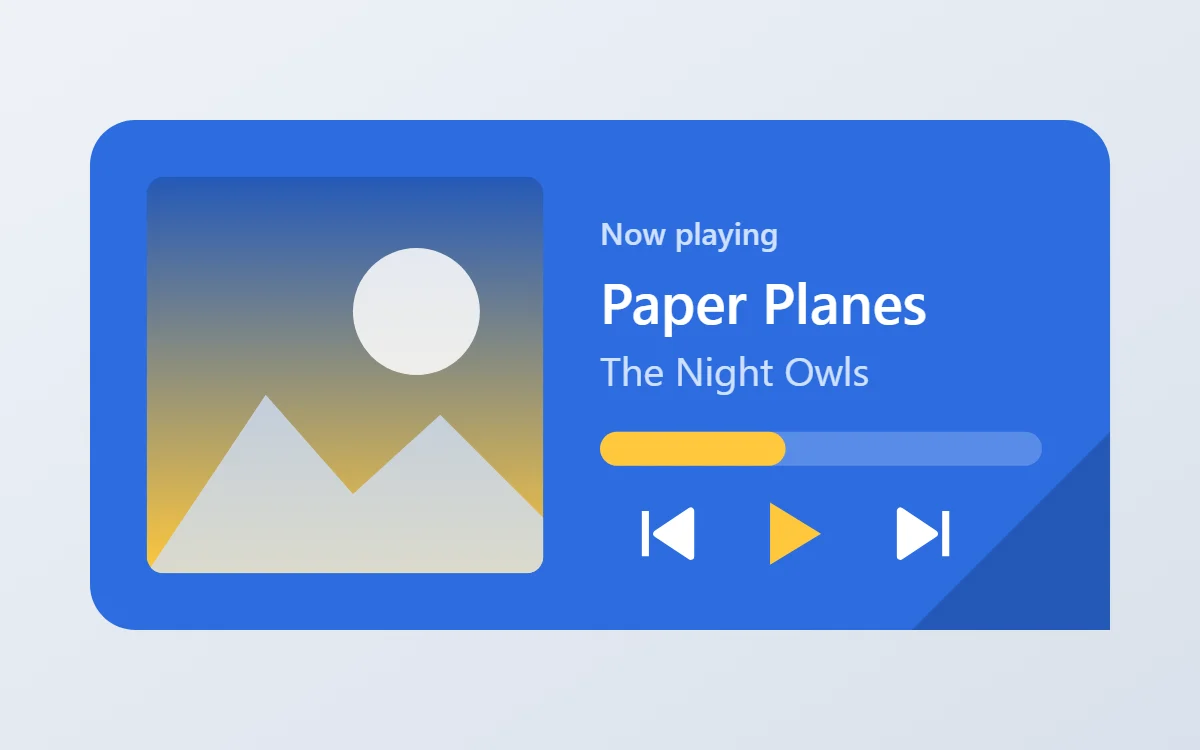
What a flat music widget shows
A now-playing widget shows cover art, the track and artist, a progress line and three controls. It works with whichever app is playing, not one particular service.
Reading the current track needs Android's notification access and a media connection, which is a Pro feature in WidgetCraft. The controls send play, pause and skip to the app that is playing.
How the flat style shapes it
Flat widgets use blocks of solid color with white text and simple shapes. There is no depth at all, which keeps them crisp at any size and quick to build.
- Photos: Use photos sparingly; a flat color illustration fits better.
- Text: Use white text on the color block with a paler tint for labels.
- Bars and rings: Use solid bars in the yellow accent on a darker shade of the background.
Flat music widget recipe
| Layer | Settings |
|---|---|
| Canvas | 360 × 180, background #2D6CDF, corner radius 16 |
| Image | cover art 140 × 140, radius 6, connected to media artwork |
| Text | track title, built-in Sans, size 20, color #FFFFFF, one line |
| Text | artist, size 14, color #CFE0FF |
| Progress | a thick 12-point bar with rounded ends, 156 wide, progress #FFC83D |
| Shapes | previous, play/pause and next; play in #FFC83D, others in #FFFFFF, each with a tap action |
| Ornament | a darker cobalt triangle filling the bottom right corner |
| Font | built-in Sans |
| Home screen size | 4 × 2 cells |
Flat color palette
- Cobalt
#2D6CDFBackground - Deep cobalt
#2459B8Surface and tracks - White
#FFFFFFText - Pale blue
#CFE0FFLabels - Sun yellow
#FFC83DAccent
How to make a flat music widget in WidgetCraft
- Create a widget and open Canvas. Set the size to 360 × 180, the background to #2D6CDF and the corner radius to 16.
- Open Data and set up the media connection; Android will ask for notification access.
- Add an Image layer, 140 × 140 with radius 6, and connect it to the cover art.
- Add two Text layers connected to the track title (size 20, #FFFFFF) and the artist (size 14, #CFE0FF).
- Add a Progress layer as a thick 12-point bar with rounded ends in #FFC83D, then three shapes for the controls. In Tap, assign previous, play/pause and next.
- Add the flat ornament with Shape layers and move them below the other layers in Layers: a darker cobalt triangle filling the bottom right corner.
- Tap Save, then Add to home screen and resize the widget on your launcher if needed.
The layout and styling are free. The live data connection for this widget needs WidgetCraft Pro, a one-time purchase.
Tips for flat music widgets
- Pick one strong background color per widget.
- Use a darker shade of the same color for tracks.
- Long titles must truncate on one line; never let them wrap into the controls.
- Make each control at least 48 dp wide so it is easy to hit.
- The widget only shows a track while a media app has an active session.
- Do not add shadows or gradients.
- Do not use more than one accent.
Questions about the flat music widget
What size is a flat music widget?
It is designed for 4 × 2 home screen cells on a 360 × 180 canvas. You can resize it on the launcher and the design scales in proportion.
Which colors does it use?
Cobalt (#2D6CDF) for the background, White (#FFFFFF) for the main text, Pale blue (#CFE0FF) for labels and Sun yellow (#FFC83D) as the accent.
Is it free to make?
The flat design is free to build. Showing live track details needs the one-time Pro upgrade.
What else is this style called?
People also search for flat design music widget, solid color music widget, simple color music widget. They describe the same look as this flat music widget.
More flat widgets
- Flat clock widget
- Flat analog clock widget
- Flat calendar widget
- Flat battery widget
- Flat countdown widget
- Flat to-do list widget
- Flat photo widget
- Flat quote widget
- Flat year progress widget
- Flat step counter widget
- Flat habit tracker widget
- Flat sticky note widget
- Flat world clock widget
- Flat date widget
- Flat home screen setup
- All flat widgets