 WidgetCraftGet the app
Gold · Home screen setup
Gold home screen setup
Gold widgets pair deep black with warm metallic gold and ivory text. Thin gold rules, an elegant capital serif and lots of dark space make them look expensive. This setup uses three widgets, one wallpaper and one palette so the whole screen reads as a single design.
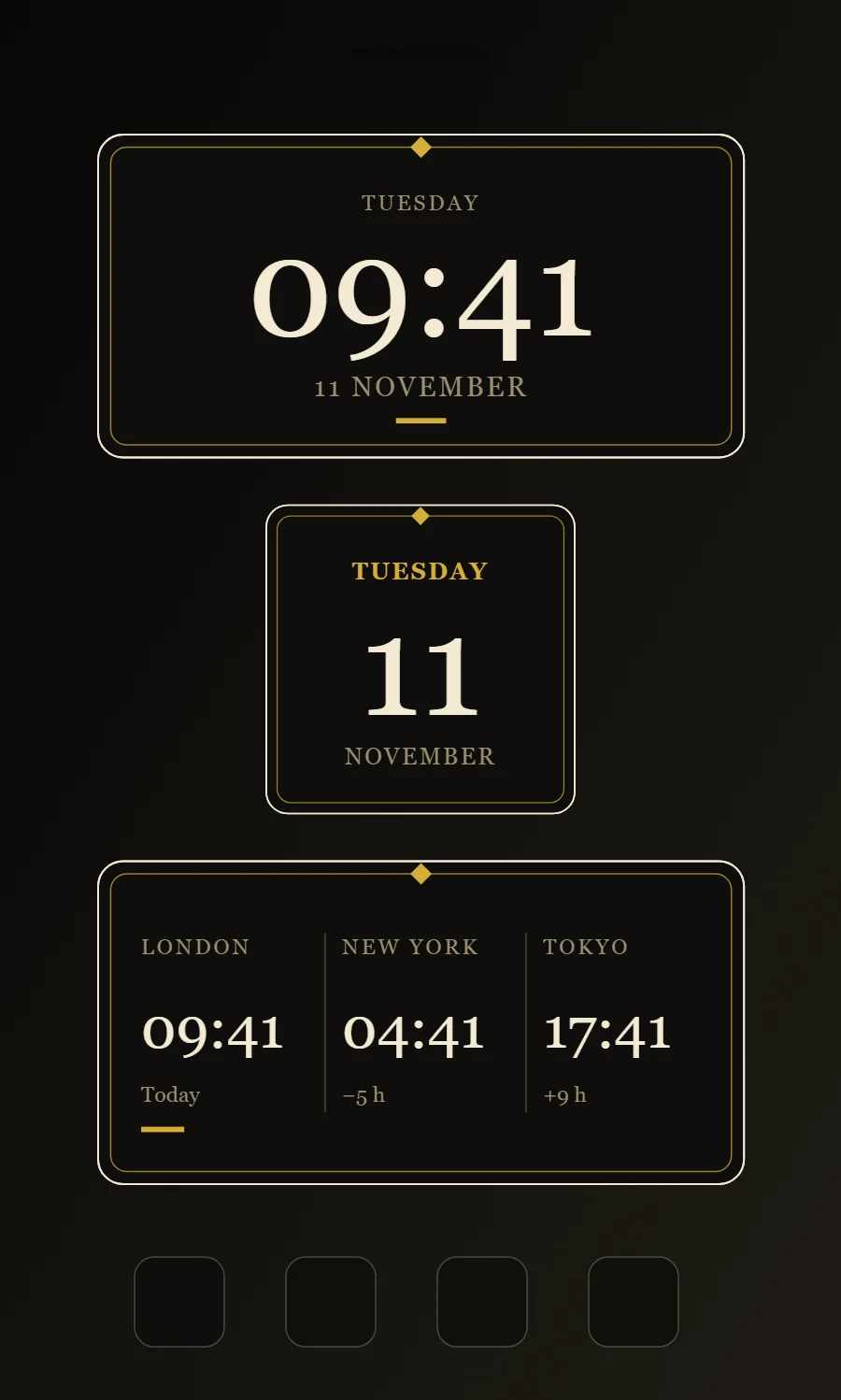
The three gold widgets
- Gold clock widget (4 × 2): shows the time in large numerals with the day and date beneath.
- Gold date widget (2 × 2): shows the weekday, a large day number and the month.
- Gold world clock widget (4 × 2): shows the time in three cities side by side.
Place them top to bottom in that order and leave the row above the dock empty so the wallpaper has room.
Clock widget settings
A digital clock is the widget most people place first. It needs to be readable from arm's length, so the time takes most of the space and the date sits quietly below it.
- Canvas: 360 × 180, background #0F0E0C, corner radius 14, outline 1 pt #F3EAD3
- Layout: stacked: weekday, time, then date, all center aligned
- Text or Date: weekday, Cinzel, size 12, color #9C8F72, capitals, letter spacing 0.1
- Numbers: Set numbers in ivory with a thin gold rule beneath.
Free to build. Full recipe and steps.
Date widget settings
A date widget is the calm alternative to a clock: one large number for the day, with the weekday above and the month below. It suits small 2 × 2 spaces and pairs well with a clock elsewhere on the screen.
- Canvas: 200 × 200, background #0F0E0C, corner radius 14, outline 1 pt #F3EAD3
- Date: weekday (pattern EEEE), size 15, color #D4AF37, centered
- Date: day number (pattern d), Cinzel, weight 500, size 92, color #F3EAD3
- Numbers: Set numbers in ivory with a thin gold rule beneath.
Free to build. Full recipe and steps.
World clock widget settings
A world clock widget is for anyone with family, friends or colleagues in another time zone. Three cities in columns, each with its time and a day hint, answer "is it too late to call?" at a glance.
- Canvas: 360 × 180, background #0F0E0C, corner radius 14, outline 1 pt #F3EAD3
- Text: city names, size 12, color #9C8F72, capitals
- Clock × 3: format HH:mm, Cinzel, size 32, color #F3EAD3, each set to its own time zone
- Numbers: Set numbers in ivory with a thin gold rule beneath.
Free to build. Full recipe and steps.
How to set up a gold home screen
- Set the wallpaper first, so you can judge every color against it.
- Build the clock widget and add it to the home screen at 4 × 2.
- Duplicate its canvas settings for the date and world clock widgets so the background, radius and outline match exactly.
- Place all three, then adjust margins until the left edges line up.
- Change the icons last, and remove any app you do not use daily from the page.
Gold wallpaper ideas
Black marble with gold veins, dark silk or plain black.
Gold icons and dock
Gold or black-and-gold icon packs.
Gold home screen colors
- Onyx
#0F0E0CBackground - Smoke
#1C1A16Surface and tracks - Ivory
#F3EAD3Text - Champagne
#9C8F72Labels - Gold
#D4AF37Accent
Fonts for a gold home screen
Use Cinzel (import the font file), or the built-in Serif at weight 500, with labels in capitals. Corner radius is 14 on every widget so the shapes match.
Do and avoid
- Use gold for lines and accents, ivory for text.
- Keep plenty of black space.
- Do not use gold for long text; it reads poorly.
- Do not add a second bright color.