 WidgetCraftGet the app
Light academia · Clock · 4 × 2 widget
Light academia clock widget
A light academia clock widget shows the time in large numerals with the day and date beneath. Sunlit study rooms: cream, soft brown and elegant serifs. This page gives the exact colors, type settings and layers, with a preview drawn from the same values.
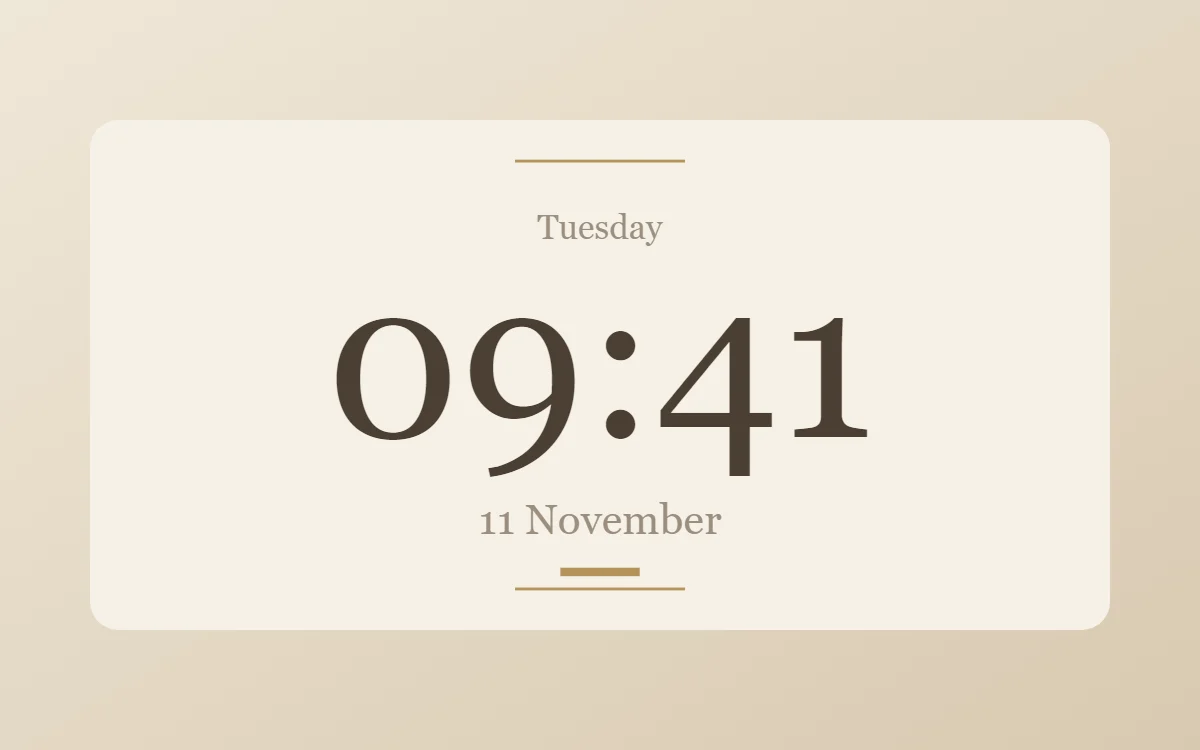
What a light academia clock widget shows
A digital clock is the widget most people place first. It needs to be readable from arm's length, so the time takes most of the space and the date sits quietly below it.
It uses the phone's own time, so it needs no permission and works offline. WidgetCraft's clock layer follows your 12- or 24-hour setting unless you choose a format.
How the light academia style shapes it
Light academia is the daytime version of dark academia: cream and linen backgrounds, soft brown text, a muted gold and airy serif type. It suits study timers, reading lists and quotes.
- Numbers: Center numbers in the serif and add a small capitalised label.
- Text: Use a refined serif in soft brown, with italic for a single word of emphasis.
Light academia clock widget recipe
| Layer | Settings |
|---|---|
| Canvas | 360 × 180, background #F6F1E7, corner radius 10 |
| Layout | stacked: weekday, time, then date, all center aligned |
| Text or Date | weekday, Playfair Display, size 12, color #9B8E7E |
| Clock | format HH:mm, Playfair Display, weight 500, size 78, color #4B3F33, center aligned |
| Date | day and month, size 15, color #9B8E7E |
| Shape | small dot or rule in #B5925A |
| Ornament | two short antique-gold rules, centered at the top and bottom |
| Font | Playfair Display (import the font file), or the built-in Serif |
| Home screen size | 4 × 2 cells |
Light academia color palette
- Ivory
#F6F1E7Background - Linen
#EAE0CFSurface and tracks - Umber
#4B3F33Text - Stone
#9B8E7ELabels - Antique gold
#B5925AAccent
How to make a light academia clock widget in WidgetCraft
- Create a widget and open Canvas. Set the size to 360 × 180, the background to #F6F1E7 and the corner radius to 10.
- Tap Add and choose Clock. Set the format to hours and minutes, the font to Playfair Display, the size to 78 and the color to #4B3F33.
- Add a Date layer above it for the weekday at size 12 in #9B8E7E.
- Add a second Date layer below for the day and month at size 15.
- Add a small Shape in #B5925A as the only accent, and center every layer.
- Arrange the layers in the stacked layout: weekday, time, then date, all center aligned.
- Add the light academia ornament with Shape layers and move them below the other layers in Layers: two short antique-gold rules, centered at the top and bottom.
- Tap Save, then Add to home screen and resize the widget on your launcher if needed.
Everything in this recipe works in the free version.
Tips for light academia clock widgets
- Use cream and brown with a little gold.
- Leave generous white space around centered text.
- Seconds make a home screen widget look busy and Android updates widgets about once a minute, so leave them out.
- Check the widest time, such as 22:58 or 12:48 PM, so it never touches the edges.
- If the launcher crops the widget, reduce the time size before reducing the margins.
- Do not use heavy black.
- Do not use more than one decorative font.
Questions about the light academia clock widget
What size is a light academia clock widget?
It is designed for 4 × 2 home screen cells on a 360 × 180 canvas. You can resize it on the launcher and the design scales in proportion.
Which colors does it use?
Ivory (#F6F1E7) for the background, Umber (#4B3F33) for the main text, Stone (#9B8E7E) for labels and Antique gold (#B5925A) as the accent.
Is it free to make?
Yes. Clock widgets use free features in WidgetCraft, and the light academia styling is free too.
What else is this style called?
People also search for academia aesthetic clock widget, study clock widget, classical clock widget. They describe the same look as this light academia clock widget.
More light academia widgets
- Light academia analog clock widget
- Light academia calendar widget
- Light academia battery widget
- Light academia countdown widget
- Light academia to-do list widget
- Light academia photo widget
- Light academia quote widget
- Light academia music widget
- Light academia year progress widget
- Light academia step counter widget
- Light academia habit tracker widget
- Light academia sticky note widget
- Light academia world clock widget
- Light academia date widget
- Light academia home screen setup
- All light academia widgets