 WidgetCraftGet the app
Monochrome · Home screen setup
Monochrome home screen setup
Monochrome widgets use no color at all. Black, white and two greys create the hierarchy, which makes any wallpaper work and gives the home screen a consistent, graphic look. This setup uses three widgets, one wallpaper and one palette so the whole screen reads as a single design.
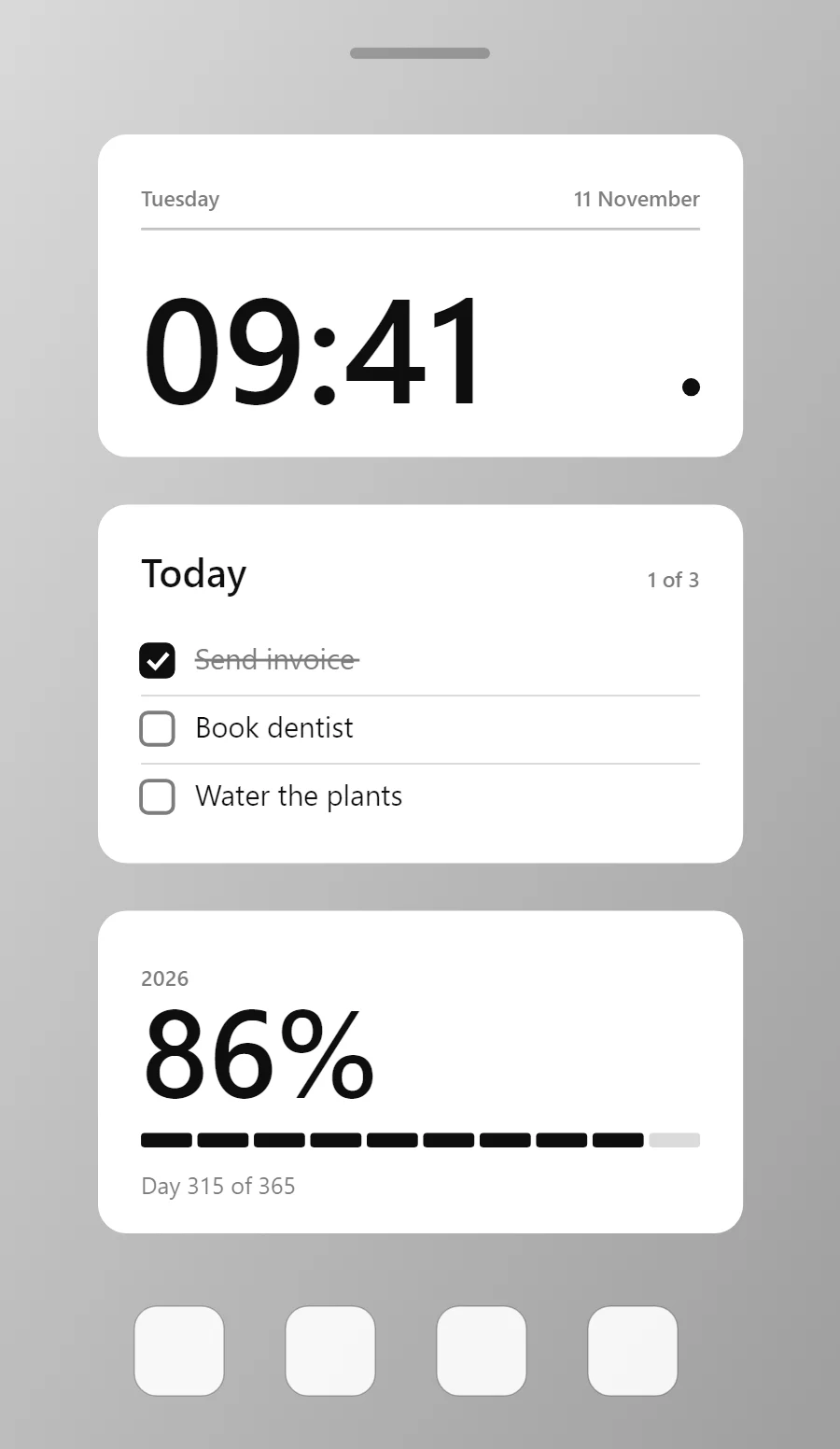
The three monochrome widgets
- Monochrome clock widget (4 × 2): shows the time in large numerals with the day and date beneath.
- Monochrome to-do list widget (4 × 2): keeps today's tasks on your home screen with boxes you can tick.
- Monochrome year progress widget (4 × 2): shows how much of the year has passed as a percentage and a bar.
Place them top to bottom in that order and leave the row above the dock empty so the wallpaper has room.
Clock widget settings
A digital clock is the widget most people place first. It needs to be readable from arm's length, so the time takes most of the space and the date sits quietly below it.
- Canvas: 360 × 180, background #FFFFFF, corner radius 16
- Layout: header: weekday on the left and date on the right in one row at the top, a hairline under it, and the time anchored to the bottom left at size 83
- Text or Date: weekday, built-in Sans, size 12, color #7D7D7D
- Numbers: Make the number black and heavy; the label beneath in mid grey.
Free to build. Full recipe and steps.
To-do list widget settings
A to-do widget works when it is short. Three tasks, a clear title and a box to tap are enough; a long list belongs in an app.
- Canvas: 360 × 200, background #FFFFFF, corner radius 16
- Text: title "Today", built-in Sans, size 22, color #0E0E0E
- Text: count such as "1 of 3", size 12, color #7D7D7D, right aligned
- Lists: Finished rows turn grey with a strikethrough; open rows stay black.
Free to build. Full recipe and steps.
Year progress widget settings
A year-progress widget is a gentle nudge: one bar that fills from 1 January to 31 December. The same layout works for the day, the week or a personal goal.
- Canvas: 360 × 180, background #FFFFFF, corner radius 16
- Text: year label, size 12, color #7D7D7D
- Text (formula): percentage of the year, built-in Sans, size 68, color #0E0E0E
- Bars and rings: Fill progress in black on a light grey track, or use segmented blocks.
Free to build. Full recipe and steps.
How to set up a monochrome home screen
- Set the wallpaper first, so you can judge every color against it.
- Build the clock widget and add it to the home screen at 4 × 2.
- Duplicate its canvas settings for the to-do list and year progress widgets so the background, radius and outline match exactly.
- Place all three, then adjust margins until the left edges line up.
- Change the icons last, and remove any app you do not use daily from the page.
Monochrome wallpaper ideas
A black-and-white photo or plain grey. Architecture and shadows suit this style.
Monochrome icons and dock
Android themed icons set to grey, or a white glyph pack.
Monochrome home screen colors
- White
#FFFFFFBackground - Light grey
#EDEDEDSurface and tracks - Black
#0E0E0EText - Mid grey
#7D7D7DLabels - Black
#0E0E0EAccent
Fonts for a monochrome home screen
Use built-in Sans at weight 600. Corner radius is 16 on every widget so the shapes match.
Do and avoid
- Check that black and white swap cleanly if you make a dark version.
- Use two greys at most.
- Do not add a colored accent; it breaks the effect.
- Do not use low-contrast grey on grey for values.