 WidgetCraftGet the app
Minimal · Home screen setup
Minimal home screen setup
Minimal widgets remove everything that is not information. One typeface, two or three colors, generous margins and no decoration, so the time or the task is the only thing you see. This setup uses three widgets, one wallpaper and one palette so the whole screen reads as a single design.
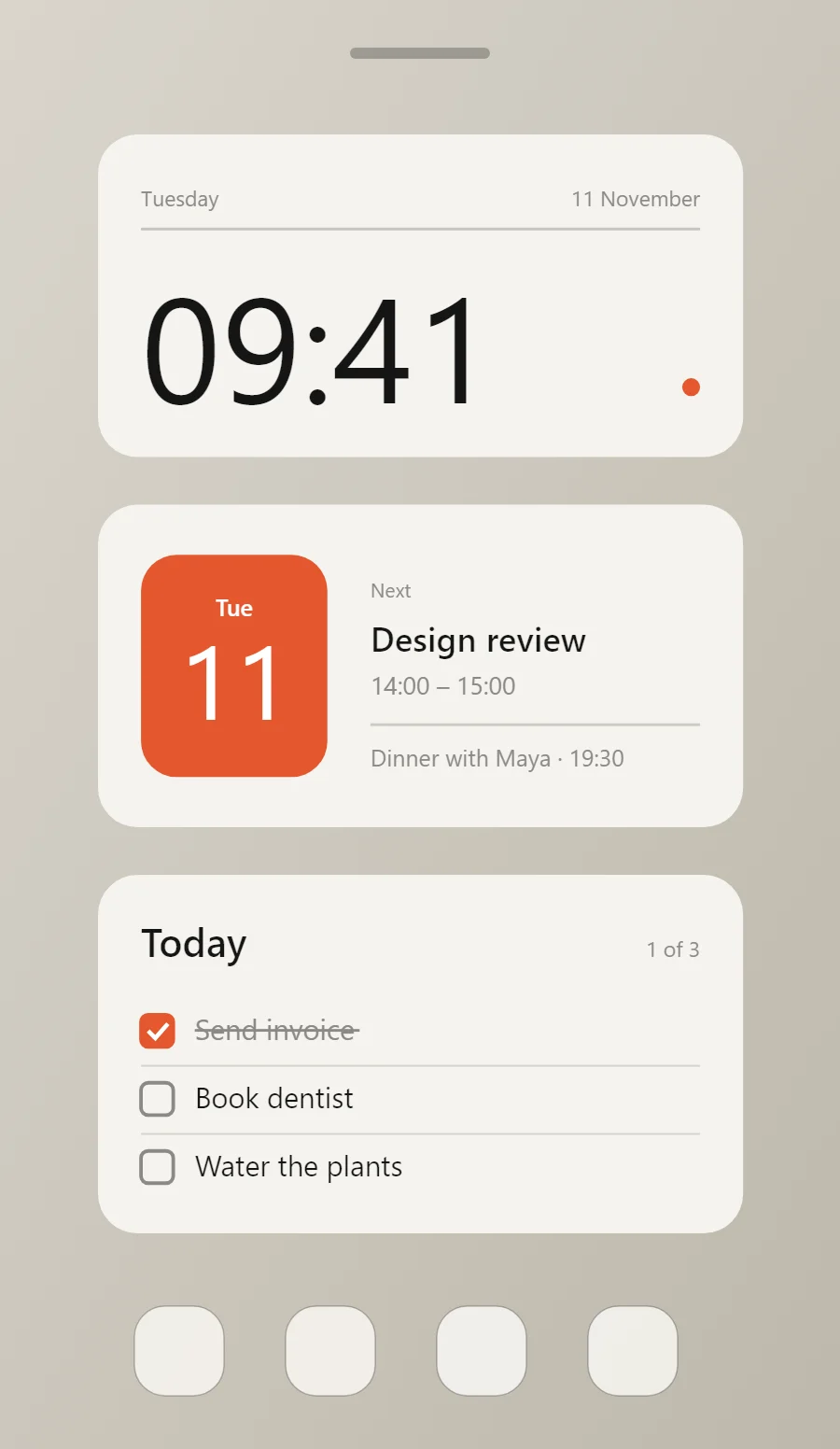
The three minimal widgets
- Minimal clock widget (4 × 2): shows the time in large numerals with the day and date beneath.
- Minimal calendar widget (4 × 2): shows today's date beside your next event.
- Minimal to-do list widget (4 × 2): keeps today's tasks on your home screen with boxes you can tick.
Place them top to bottom in that order and leave the row above the dock empty so the wallpaper has room.
Clock widget settings
A digital clock is the widget most people place first. It needs to be readable from arm's length, so the time takes most of the space and the date sits quietly below it.
- Canvas: 360 × 180, background #F5F3EE, corner radius 22
- Layout: header: weekday on the left and date on the right in one row at the top, a hairline under it, and the time anchored to the bottom left at size 83
- Text or Date: weekday, built-in Sans, size 12, color #8B8A85
- Numbers: Give the main number at least half the widget height and keep everything else under 14 points.
Free to build. Full recipe and steps.
Calendar widget settings
A calendar widget answers two questions: what day is it, and what is next. The date sits in a bold block on the left and the next event takes the right side.
- Canvas: 360 × 180, background #F5F3EE, corner radius 22
- Shape: date block 104 × 124, radius 20, fill #E4572E
- Date: weekday (size 13) and day number (size 58) centered on the block, color #FFFFFF
- Numbers: Give the main number at least half the widget height and keep everything else under 14 points.
Styling is free; the live data needs Pro. Full recipe and steps.
To-do list widget settings
A to-do widget works when it is short. Three tasks, a clear title and a box to tap are enough; a long list belongs in an app.
- Canvas: 360 × 200, background #F5F3EE, corner radius 22
- Text: title "Today", built-in Sans, size 22, color #151515
- Text: count such as "1 of 3", size 12, color #8B8A85, right aligned
- Lists: Keep rows to one line each with a faint divider, and show no more than three.
Free to build. Full recipe and steps.
How to set up a minimal home screen
- Set the wallpaper first, so you can judge every color against it.
- Build the clock widget and add it to the home screen at 4 × 2.
- Duplicate its canvas settings for the calendar and to-do list widgets so the background, radius and outline match exactly.
- Place all three, then adjust margins until the left edges line up.
- Change the icons last, and remove any app you do not use daily from the page.
Minimal wallpaper ideas
A plain or softly textured wallpaper in a warm grey, sand or off-white keeps the widgets calm. Avoid busy photos.
Minimal icons and dock
Use a monochrome or outline icon pack and keep the dock to four apps.
Minimal home screen colors
- Paper
#F5F3EEBackground - Linen
#E9E6DFSurface and tracks - Ink
#151515Text - Stone
#8B8A85Labels - Signal
#E4572EAccent
Fonts for a minimal home screen
Use built-in Sans at weight 400. Corner radius is 22 on every widget so the shapes match.
Do and avoid
- Leave at least 20 points of margin on every side.
- Pick one accent color and use it once per widget.
- Do not add icons next to every label.
- Do not mix more than two text sizes below the headline.