 WidgetCraftGet the app
Neo-brutalist · Home screen setup
Neo-brutalist home screen setup
Neo-brutalism is the playful cousin of brutalism: saturated yellow, pink or mint cards with thick black outlines and a solid black shadow shifted down and right. This setup uses three widgets, one wallpaper and one palette so the whole screen reads as a single design.
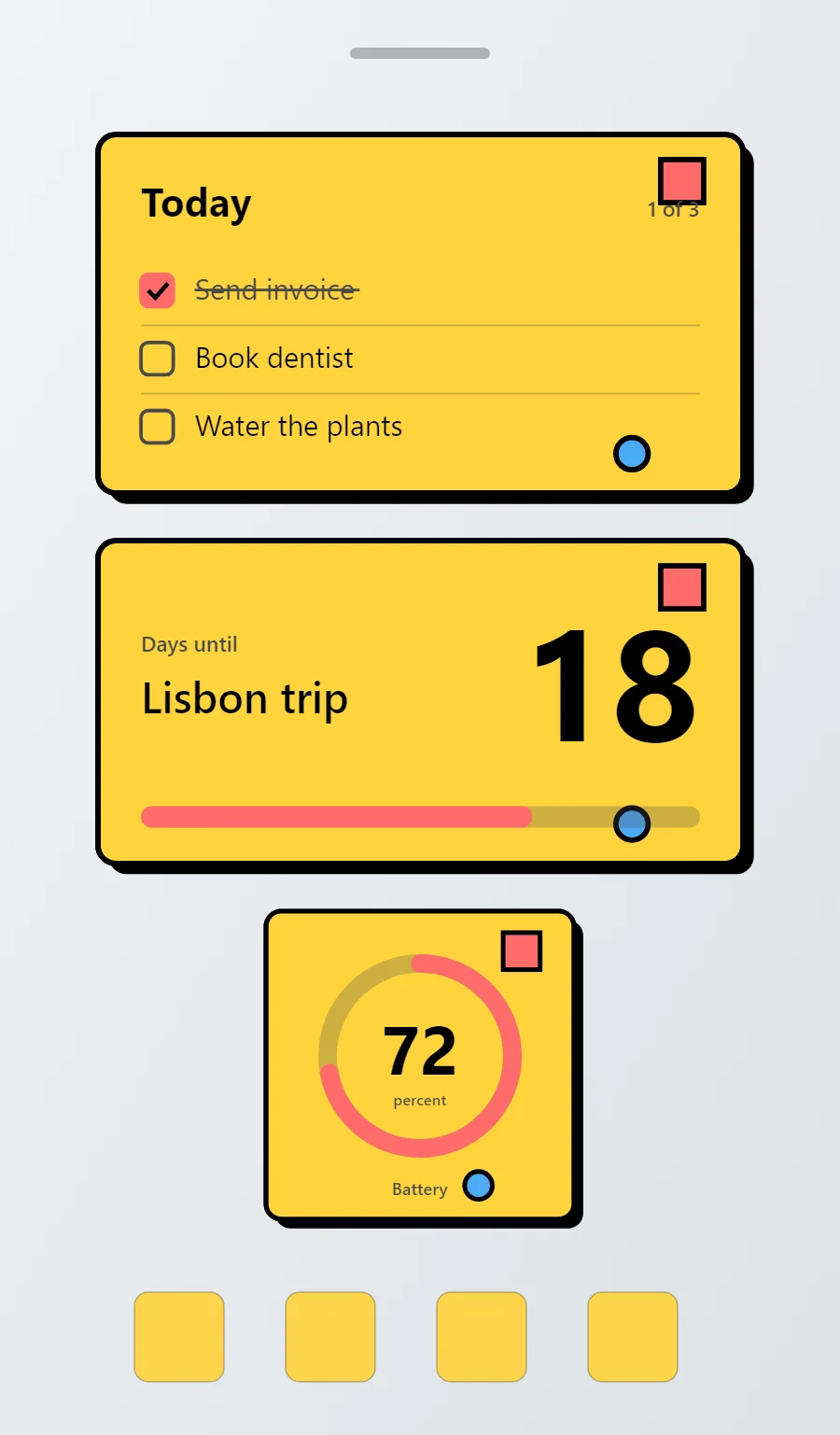
The three neo-brutalist widgets
- Neo-brutalist to-do list widget (4 × 2): keeps today's tasks on your home screen with boxes you can tick.
- Neo-brutalist countdown widget (4 × 2): counts the days left until a date you choose.
- Neo-brutalist battery widget (2 × 2): shows your charge level as a ring with the percentage in the middle.
Place them top to bottom in that order and leave the row above the dock empty so the wallpaper has room.
To-do list widget settings
A to-do widget works when it is short. Three tasks, a clear title and a box to tap are enough; a long list belongs in an app.
- Canvas: 360 × 200, background #FFD43B, corner radius 10, outline 3 pt #000000, shadow #000000 offset 6/6 with radius 0
- Text: title "Today", Space Grotesk, size 22, color #000000
- Text: count such as "1 of 3", size 12, color #4A4A4A, right aligned
- Lists: Use outlined square checkboxes and a coral fill for done.
Free to build. Full recipe and steps.
Countdown widget settings
A countdown widget keeps one date in view: a trip, a birthday, an exam or a launch. The number of days is the hero, the event name gives it meaning and a bar shows how far along you are.
- Canvas: 360 × 180, background #FFD43B, corner radius 10, outline 3 pt #000000, shadow #000000 offset 6/6 with radius 0
- Layout: split: label and event name on the left, the number right aligned and larger on the right
- Text: label "Days until", size 12, color #4A4A4A
- Numbers: Make numbers heavy and black on the bright card.
Free to build. Full recipe and steps.
Battery widget settings
A battery widget turns one number into a shape you can read without thinking. A ring that fills clockwise is the clearest form, with the percentage inside it.
- Canvas: 200 × 200, background #FFD43B, corner radius 10, outline 3 pt #000000, shadow #000000 offset 6/6 with radius 0
- Ring: diameter 120, stroke 12, track #4A4A4A at 28% opacity, progress #FF6B6B, round ends, start at top
- Battery: level as a number, Space Grotesk, size 44, color #000000, centered in the ring
- Bars and rings: Outline every bar and ring in black and fill with a second bright color.
Free to build. Full recipe and steps.
How to set up a neo-brutalist home screen
- Set the wallpaper first, so you can judge every color against it.
- Build the to-do list widget and add it to the home screen at 4 × 2.
- Duplicate its canvas settings for the countdown and battery widgets so the background, radius and outline match exactly.
- Place all three, then adjust margins until the left edges line up.
- Change the icons last, and remove any app you do not use daily from the page.
Neo-brutalist wallpaper ideas
A plain light grey or white wallpaper so the colored cards stand out.
Neo-brutalist icons and dock
Bold outlined icon packs.
Neo-brutalist home screen colors
- Lemon
#FFD43BBackground - Butter
#FFF3BFSurface and tracks - Black
#000000Text - Charcoal
#4A4A4ALabels - Coral
#FF6B6BAccent
Fonts for a neo-brutalist home screen
Use Space Grotesk (import the font file), or the built-in Sans at weight 700. Corner radius is 10 on every widget so the shapes match.
Do and avoid
- Add a solid black shadow offset 6 points right and down, radius 0.
- Outline everything at 3 points.
- Do not use soft or blurred shadows.
- Do not use pastel or muted color.