 WidgetCraftGet the app
Y2K · Home screen setup
Y2K home screen setup
Y2K widgets recall the year 2000: glossy bubble shapes, icy blue and hot pink, chrome highlights and playful rounded type, like an old music player skin. This setup uses three widgets, one wallpaper and one palette so the whole screen reads as a single design.
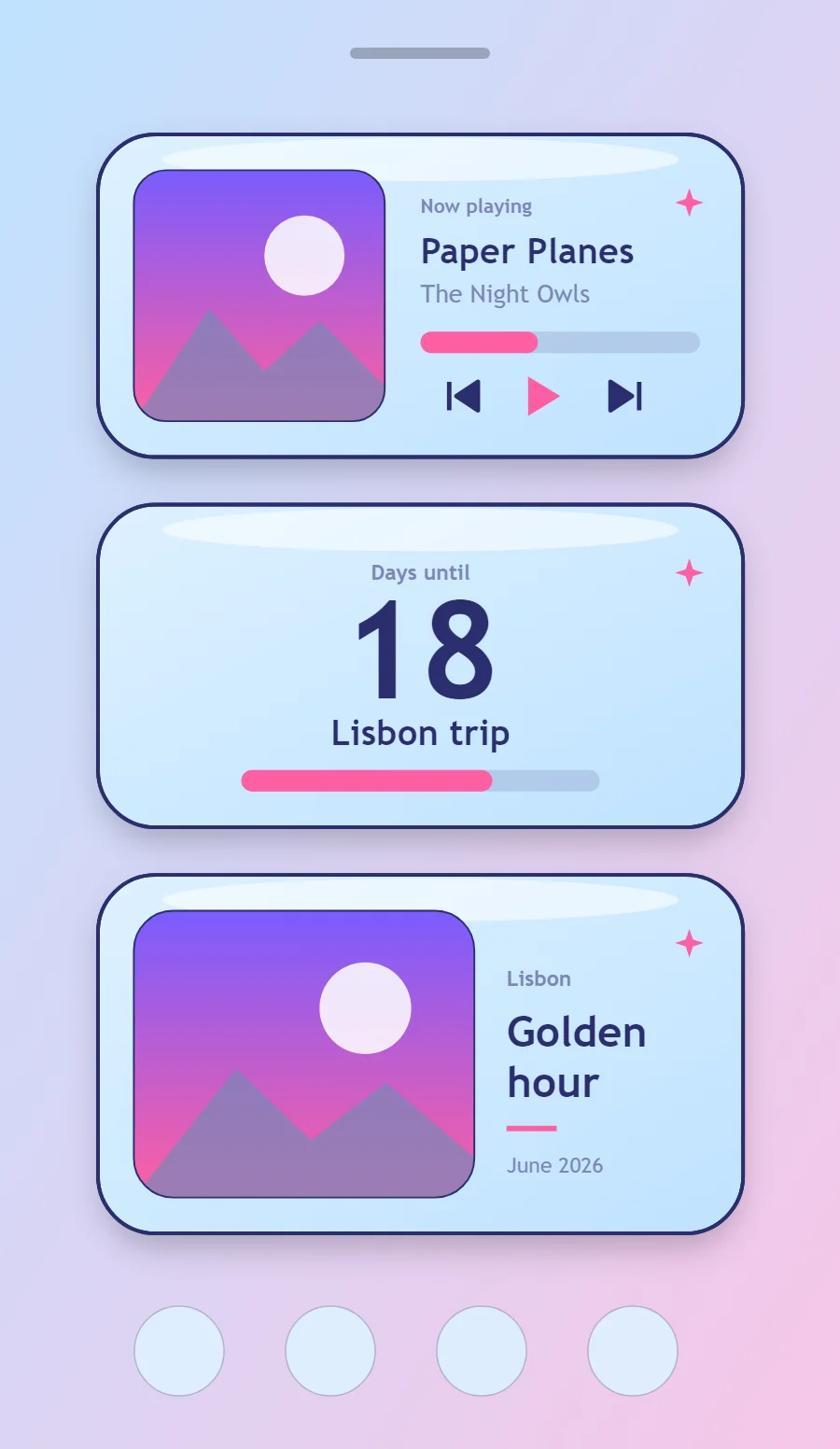
The three Y2K widgets
- Y2K music widget (4 × 2): shows the song that is playing with play, pause and skip controls.
- Y2K countdown widget (4 × 2): counts the days left until a date you choose.
- Y2K photo widget (4 × 2): frames a favorite picture with a short caption.
Place them top to bottom in that order and leave the row above the dock empty so the wallpaper has room.
Music player widget settings
A now-playing widget shows cover art, the track and artist, a progress line and three controls. It works with whichever app is playing, not one particular service.
- Canvas: 360 × 180, background gradient #DDF1FF to #BFE2FF at 45°, corner radius 32, outline 2 pt #2A2E6E, soft shadow radius 12 at low opacity
- Image: cover art 140 × 140, radius 18, connected to media artwork
- Text: track title, Quicksand, size 20, color #2A2E6E, one line
- Photos: Round photos into circles or soft squares with a white outline.
Styling is free; the live data needs Pro. Full recipe and steps.
Countdown widget settings
A countdown widget keeps one date in view: a trip, a birthday, an exam or a launch. The number of days is the hero, the event name gives it meaning and a bar shows how far along you are.
- Canvas: 360 × 180, background gradient #DDF1FF to #BFE2FF at 45°, corner radius 32, outline 2 pt #2A2E6E, soft shadow radius 12 at low opacity
- Layout: stacked: label, number and event name, center aligned
- Text: label "Days until", size 12, color #7C86B8
- Numbers: Put the number in a pill or bubble shape with a light gradient.
Free to build. Full recipe and steps.
Photo widget settings
A photo widget puts a person, place or pet on the home screen without making it the wallpaper. The frame, the crop and the caption decide whether it feels designed or just pasted in.
- Canvas: 360 × 200, background gradient #DDF1FF to #BFE2FF at 45°, corner radius 32, outline 2 pt #2A2E6E, soft shadow radius 12 at low opacity
- Layout: photo on the left, caption on the right
- Image: 190 × 160, corner radius 22, crop to fill, 1 pt outline
- Photos: Round photos into circles or soft squares with a white outline.
Free to build. Full recipe and steps.
How to set up a Y2K home screen
- Set the wallpaper first, so you can judge every color against it.
- Build the music widget and add it to the home screen at 4 × 2.
- Duplicate its canvas settings for the countdown and photo widgets so the background, radius and outline match exactly.
- Place all three, then adjust margins until the left edges line up.
- Change the icons last, and remove any app you do not use daily from the page.
Y2K wallpaper ideas
Blue sky with clouds, chrome textures or a pink-blue gradient.
Y2K icons and dock
Glossy or bubbly icon packs in pink and blue.
Y2K home screen colors
- Ice blue
#DDF1FFBackground - Sky gel
#BFE2FFSurface and tracks - Indigo
#2A2E6EText - Periwinkle
#7C86B8Labels - Hot pink
#FF5FA2Accent
Fonts for a Y2K home screen
Use Quicksand (import the font file), or the built-in Sans at weight 700. Corner radius is 32 on every widget so the shapes match.
Do and avoid
- Use gradients from light blue to white for a gel look.
- Round everything, including the outline.
- Do not use square corners.
- Do not use muted or earthy colors.