 WidgetCraftGet the app
Vaporwave · Home screen setup
Vaporwave home screen setup
Vaporwave widgets use a pink-to-purple sunset gradient, teal highlights and wide retro type. The look comes from 1980s graphics remembered through early internet art. This setup uses three widgets, one wallpaper and one palette so the whole screen reads as a single design.
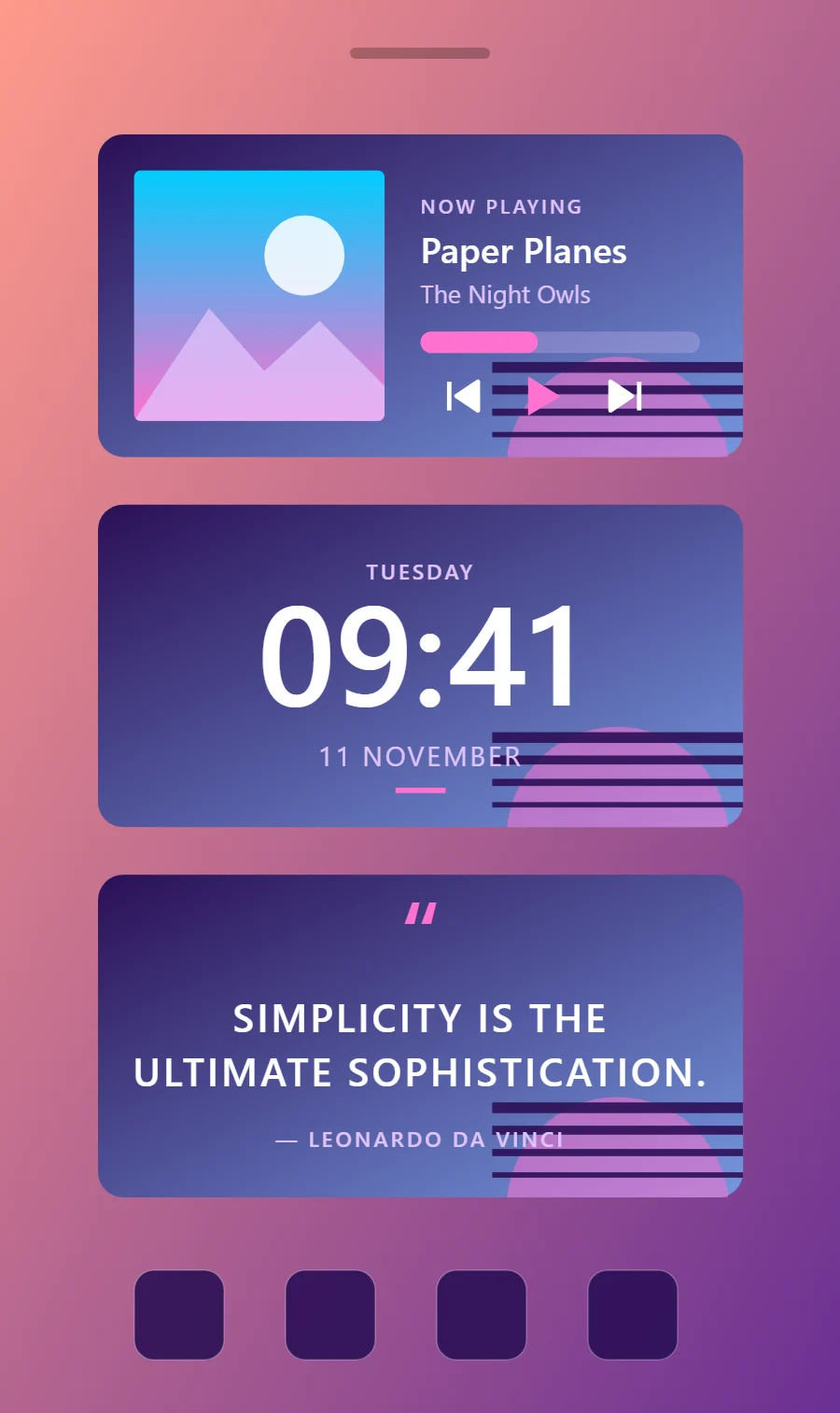
The three vaporwave widgets
- Vaporwave music widget (4 × 2): shows the song that is playing with play, pause and skip controls.
- Vaporwave clock widget (4 × 2): shows the time in large numerals with the day and date beneath.
- Vaporwave quote widget (4 × 2): displays a line you want to see every day.
Place them top to bottom in that order and leave the row above the dock empty so the wallpaper has room.
Music player widget settings
A now-playing widget shows cover art, the track and artist, a progress line and three controls. It works with whichever app is playing, not one particular service.
- Canvas: 360 × 180, background gradient #2B1055 to #7597DE at 45°, corner radius 14
- Image: cover art 140 × 140, radius 4, connected to media artwork
- Text: track title, Righteous, size 20, color #FFFFFF, one line
- Photos: Tint photos pink or purple; palm trees and sunsets are the classic subjects.
Styling is free; the live data needs Pro. Full recipe and steps.
Clock widget settings
A digital clock is the widget most people place first. It needs to be readable from arm's length, so the time takes most of the space and the date sits quietly below it.
- Canvas: 360 × 180, background gradient #2B1055 to #7597DE at 45°, corner radius 14
- Layout: stacked: weekday, time, then date, all center aligned
- Text or Date: weekday, Righteous, size 12, color #E0C3FC, capitals, letter spacing 0.1
- Numbers: Center the number in white over the gradient and keep it bold.
Free to build. Full recipe and steps.
Quote widget settings
A quote widget is pure typography, so the style shows more clearly here than anywhere else. Line length, line spacing and the size of the quotation mark do the design work.
- Canvas: 360 × 180, background gradient #2B1055 to #7597DE at 45°, corner radius 14
- Text: opening quotation mark, size 54, color #FF71CE
- Text: quote in two lines, Righteous, weight 600, size 22, line spacing 1.35, color #FFFFFF, center aligned
- Text: Use wide capitals in white with a pink or teal label underneath.
Free to build. Full recipe and steps.
How to set up a vaporwave home screen
- Set the wallpaper first, so you can judge every color against it.
- Build the music widget and add it to the home screen at 4 × 2.
- Duplicate its canvas settings for the clock and quote widgets so the background, radius and outline match exactly.
- Place all three, then adjust margins until the left edges line up.
- Change the icons last, and remove any app you do not use daily from the page.
Vaporwave wallpaper ideas
A sunset gradient, grid horizon or palm silhouette.
Vaporwave icons and dock
Pink or gradient icon packs with rounded squares.
Vaporwave home screen colors
- Twilight
#2B1055Background - Haze blue
#7597DESurface and tracks - White
#FFFFFFText - Lavender
#E0C3FCLabels - Bubblegum
#FF71CEAccent
Fonts for a vaporwave home screen
Use Righteous (import the font file), or the built-in Sans at weight 600, with labels in capitals. Corner radius is 14 on every widget so the shapes match.
Do and avoid
- Set the background to a gradient from purple to blue at an angle.
- Use pink and teal as the only accents.
- Do not use dark grey text; white reads best on the gradient.
- Do not add extra colors beyond pink, purple and teal.