 WidgetCraftGet the app
Newspaper · Home screen setup
Newspaper home screen setup
Newspaper widgets copy a front page: a bold serif headline, a dateline in small capitals, double rules and tight columns in black on newsprint. This setup uses three widgets, one wallpaper and one palette so the whole screen reads as a single design.
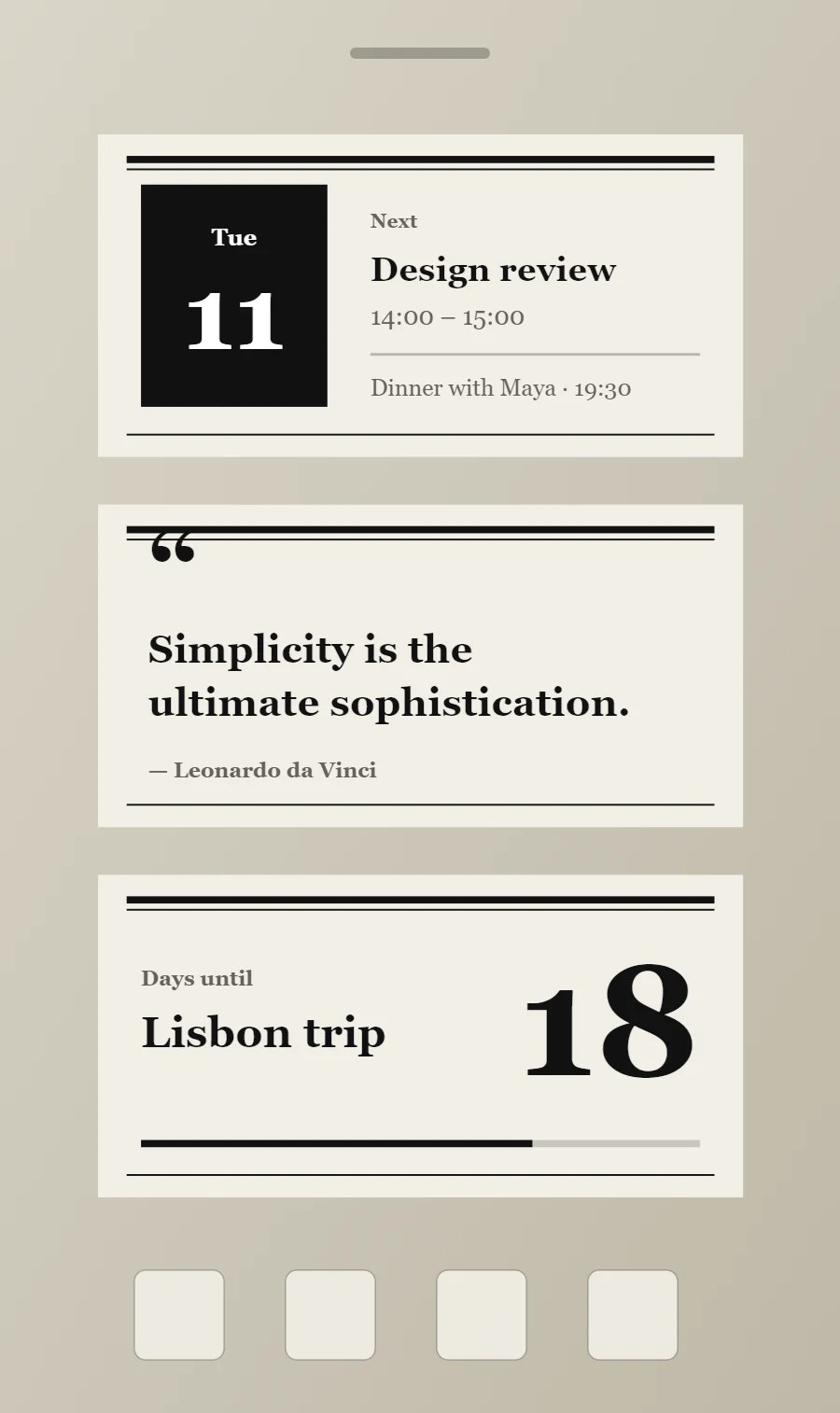
The three newspaper widgets
- Newspaper calendar widget (4 × 2): shows today's date beside your next event.
- Newspaper quote widget (4 × 2): displays a line you want to see every day.
- Newspaper countdown widget (4 × 2): counts the days left until a date you choose.
Place them top to bottom in that order and leave the row above the dock empty so the wallpaper has room.
Calendar widget settings
A calendar widget answers two questions: what day is it, and what is next. The date sits in a bold block on the left and the next event takes the right side.
- Canvas: 360 × 180, background #F1EEE6, corner radius 0
- Shape: date block 104 × 124, radius 0, fill #111111
- Date: weekday (size 13) and day number (size 58) centered on the block, color #FFFFFF
- Numbers: Set the number like a headline figure with a caption beneath.
Styling is free; the live data needs Pro. Full recipe and steps.
Quote widget settings
A quote widget is pure typography, so the style shows more clearly here than anywhere else. Line length, line spacing and the size of the quotation mark do the design work.
- Canvas: 360 × 180, background #F1EEE6, corner radius 0
- Text: opening quotation mark, size 54, color #111111
- Text: quote in two lines, Playfair Display, weight 700, size 22, line spacing 1.35, color #111111, left aligned
- Text: Write the title as a headline in bold serif and add a dateline in small capitals.
Free to build. Full recipe and steps.
Countdown widget settings
A countdown widget keeps one date in view: a trip, a birthday, an exam or a launch. The number of days is the hero, the event name gives it meaning and a bar shows how far along you are.
- Canvas: 360 × 180, background #F1EEE6, corner radius 0
- Layout: split: label and event name on the left, the number right aligned and larger on the right
- Text: label "Days until", size 12, color #666159
- Numbers: Set the number like a headline figure with a caption beneath.
Free to build. Full recipe and steps.
How to set up a newspaper home screen
- Set the wallpaper first, so you can judge every color against it.
- Build the calendar widget and add it to the home screen at 4 × 2.
- Duplicate its canvas settings for the quote and countdown widgets so the background, radius and outline match exactly.
- Place all three, then adjust margins until the left edges line up.
- Change the icons last, and remove any app you do not use daily from the page.
Newspaper wallpaper ideas
Newsprint texture or plain off-white.
Newspaper icons and dock
Black glyph icons.
Newspaper home screen colors
- Newsprint
#F1EEE6Background - Fold grey
#E4DFD3Surface and tracks - Ink black
#111111Text - Halftone
#666159Labels - Ink black
#111111Accent
Fonts for a newspaper home screen
Use Playfair Display (import the font file), or the built-in Serif at weight 700. Corner radius is 0 on every widget so the shapes match.
Do and avoid
- Add a thick rule and a thin rule together as a masthead line.
- Keep everything black on newsprint.
- Do not use color except one dark red word.
- Do not round the corners.