 WidgetCraftGet the app
Nothing-style · Year progress · 4 × 2 widget
Nothing-style year progress widget
A Nothing-style year progress widget shows how much of the year has passed as a percentage and a bar. Dot-matrix numerals, black, white and a single red dot. This page gives the exact colors, type settings and layers, with a preview drawn from the same values.
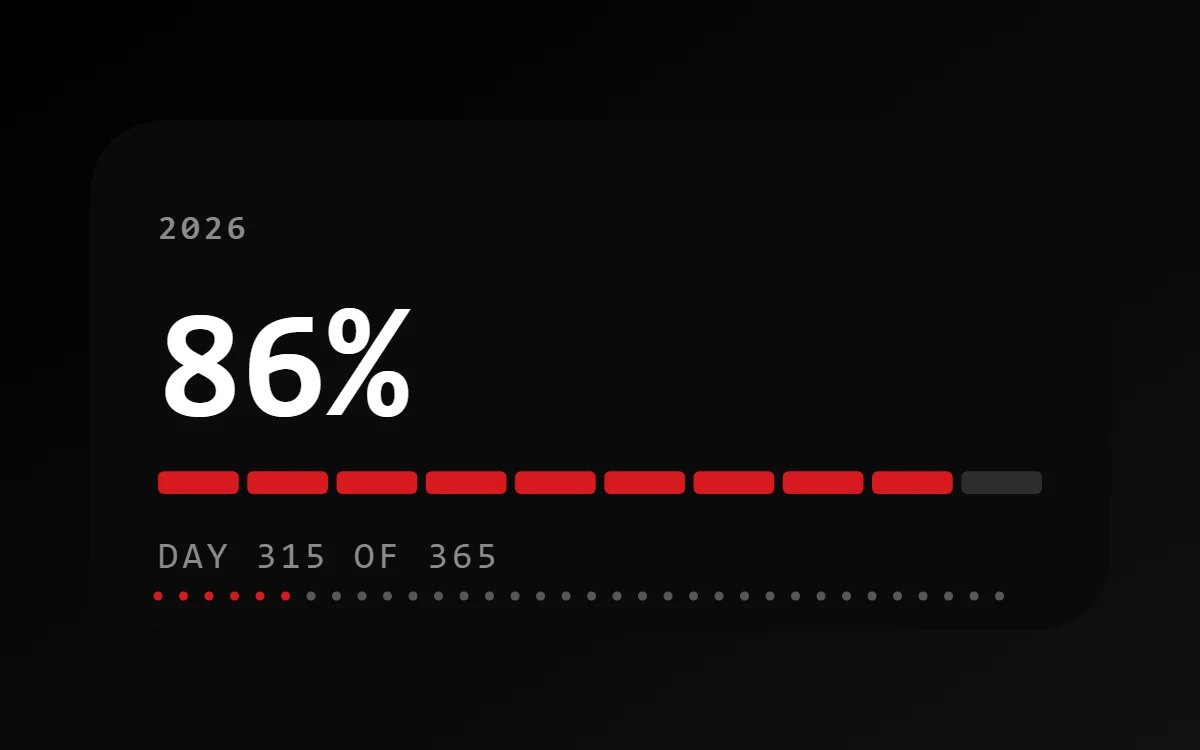
What a Nothing-style year progress widget shows
A year-progress widget is a gentle nudge: one bar that fills from 1 January to 31 December. The same layout works for the day, the week or a personal goal.
It is calculated from the date, so it is free, offline and needs no permission. WidgetCraft includes a free Day progress component, and a formula can stretch it to the year.
How the Nothing-style style shapes it
Nothing-style widgets copy the dot-matrix look of Nothing phones: numerals built from dots, strict black and white, small technical labels and one red accent. A dot-matrix font does most of the work.
- Bars and rings: Build progress from rows of small dots or short segments.
- Numbers: Set the number in the dot-matrix font as large as the widget allows.
Nothing-style year progress widget recipe
| Layer | Settings |
|---|---|
| Canvas | 360 × 180, background #0A0A0A, corner radius 26 |
| Text | year label, size 12, color #8A8A8A |
| Text (formula) | percentage of the year, Doto, size 54, color #FFFFFF |
| Progress | ten short segments, 312 wide, progress #D71921, range 0 to 365 |
| Text | "Day 315 of 365", size 13, color #8A8A8A |
| Ornament | a row of small dots along the bottom, the first six in red |
| Font | Doto (import the font file), or the built-in Mono |
| Home screen size | 4 × 2 cells |
Nothing-style color palette
- Black
#0A0A0ABackground - Charcoal
#1A1A1ASurface and tracks - White
#FFFFFFText - Grey
#8A8A8ALabels - Signal red
#D71921Accent
How to make a Nothing-style year progress widget in WidgetCraft
- Create a widget and open Canvas. Set the size to 360 × 180, the background to #0A0A0A and the corner radius to 26.
- Tap Add and choose Progress. Make it 312 wide, styled as ten short segments.
- Open Data and connect it to the day of the year with a range of 0 to 365.
- Color the progress #D71921 and keep the track faint.
- Add a Text layer for the percentage at size 54 in #FFFFFF, and a smaller one for the day count at size 13 in #8A8A8A.
- Add the Nothing-style ornament with Shape layers and move them below the other layers in Layers: a row of small dots along the bottom, the first six in red.
- Tap Save, then Add to home screen and resize the widget on your launcher if needed.
Everything in this recipe works in the free version.
Tips for Nothing-style year progress widgets
- Import a free dot-matrix font such as Doto.
- Use red only as a single dot or one word.
- Show both the percentage and the day count so the bar has context.
- Use a segmented bar if you want each step to feel like a milestone.
- For a goal of your own, connect the bar to a counter instead of the date.
- Do not add color beyond the red accent.
- Do not use more than one dot-matrix line per widget; it gets hard to read.
Questions about the Nothing-style year progress widget
What size is a Nothing-style year progress widget?
It is designed for 4 × 2 home screen cells on a 360 × 180 canvas. You can resize it on the launcher and the design scales in proportion.
Which colors does it use?
Black (#0A0A0A) for the background, White (#FFFFFF) for the main text, Grey (#8A8A8A) for labels and Signal red (#D71921) as the accent.
Is it free to make?
Yes. Year progress widgets use free features in WidgetCraft, and the Nothing-style styling is free too.
What else is this style called?
People also search for dot matrix year progress widget, nothing os year progress widget, nothing phone style year progress widget, led year progress widget. They describe the same look as this Nothing-style year progress widget.
More Nothing-style widgets
- Nothing-style clock widget
- Nothing-style analog clock widget
- Nothing-style calendar widget
- Nothing-style battery widget
- Nothing-style countdown widget
- Nothing-style to-do list widget
- Nothing-style photo widget
- Nothing-style quote widget
- Nothing-style music widget
- Nothing-style step counter widget
- Nothing-style habit tracker widget
- Nothing-style sticky note widget
- Nothing-style world clock widget
- Nothing-style date widget
- Nothing-style home screen setup
- All Nothing-style widgets