 WidgetCraftGet the app
Paper · Countdown · 4 × 2 widget
Paper countdown widget
A paper countdown widget counts the days left until a date you choose. Sticky notes and index cards with soft shadows. This page gives the exact colors, type settings and layers, with a preview drawn from the same values.
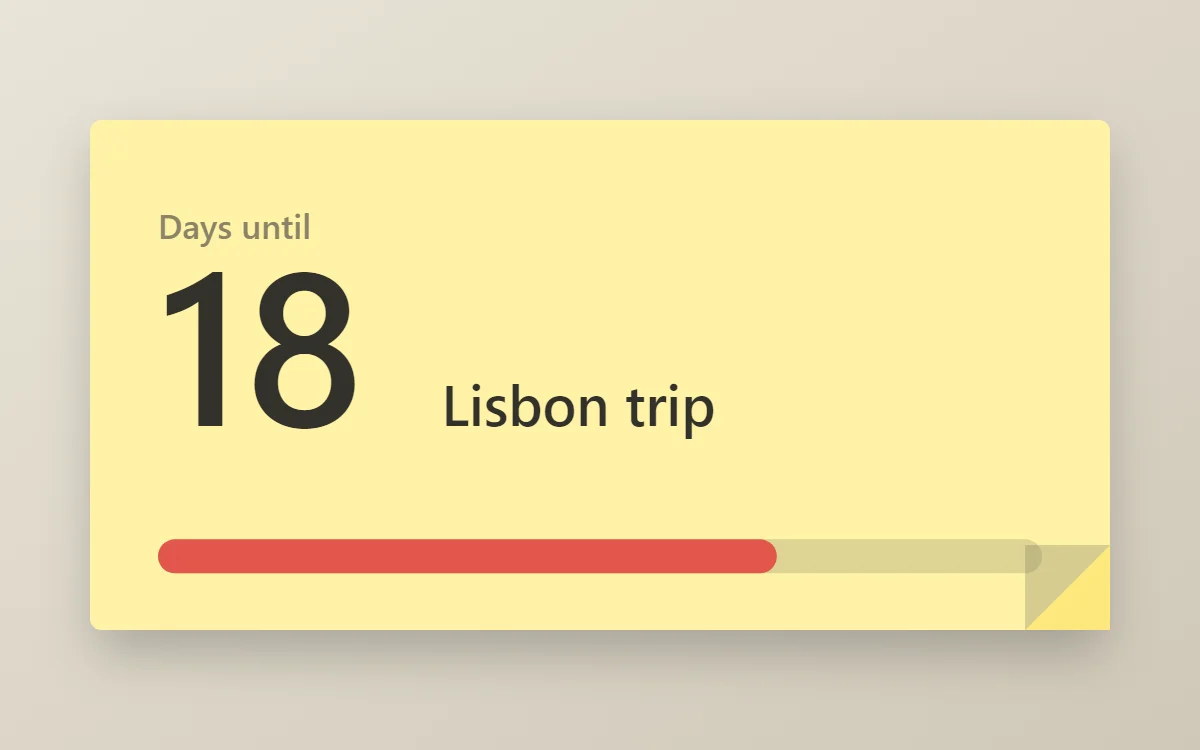
What a paper countdown widget shows
A countdown widget keeps one date in view: a trip, a birthday, an exam or a launch. The number of days is the hero, the event name gives it meaning and a bar shows how far along you are.
WidgetCraft's countdown layer works from the phone's clock, so it is free, needs no permission and works offline. You pick the target date in the layer's details.
How the paper style shapes it
Paper widgets look like sticky notes or index cards on a desk: flat yellow or white paper, a soft shadow underneath and dark pencil-grey text.
- Numbers: Write the number big with a marker-red underline.
- Bars and rings: Use thick marker-style bars.
Paper countdown widget recipe
| Layer | Settings |
|---|---|
| Canvas | 360 × 180, background #FFF3A6, corner radius 4, soft shadow radius 12 at low opacity |
| Layout | stacked: label, number and event name, left aligned |
| Text | label "Days until", size 12, color #8A8468 |
| Countdown | days remaining, Kalam, size 76, color #33312B |
| Text | event name, size 20, color #33312B |
| Progress | a thick 12-point bar with rounded ends, 312 wide, progress #E2574C |
| Ornament | a folded corner at the bottom right made from two small triangles, one slightly darker |
| Font | Kalam (import the font file), or the built-in Sans |
| Home screen size | 4 × 2 cells |
Paper color palette
- Note yellow
#FFF3A6Background - Fold
#FCE77DSurface and tracks - Graphite
#33312BText - Pencil
#8A8468Labels - Red marker
#E2574CAccent
How to make a paper countdown widget in WidgetCraft
- Create a widget and open Canvas. Set the size to 360 × 180, the background to #FFF3A6 and the corner radius to 4.
- Tap Add and choose Countdown. Pick your target date and show days only.
- Set the font to Kalam, the size to 76 and the color to #33312B.
- Add a Text label "Days until" at size 12 in #8A8468, and a second Text layer for the event name at size 20.
- Add a Progress layer as a thick 12-point bar with rounded ends in #E2574C to show how much of the wait has passed.
- Add the paper ornament with Shape layers and move them below the other layers in Layers: a folded corner at the bottom right made from two small triangles, one slightly darker.
- Tap Save, then Add to home screen and resize the widget on your launcher if needed.
Everything in this recipe works in the free version.
Tips for paper countdown widgets
- Add a soft shadow below the note.
- Keep corners nearly square, like real paper.
- Decide whether today counts; label the number "days left" or "sleeps" so it is not ambiguous.
- Short event names fit best. Two or three words is ideal.
- After the date passes, change the target or the widget will sit at zero.
- Do not use glossy effects.
- Do not use white text.
Questions about the paper countdown widget
What size is a paper countdown widget?
It is designed for 4 × 2 home screen cells on a 360 × 180 canvas. You can resize it on the launcher and the design scales in proportion.
Which colors does it use?
Note yellow (#FFF3A6) for the background, Graphite (#33312B) for the main text, Pencil (#8A8468) for labels and Red marker (#E2574C) as the accent.
Is it free to make?
Yes. Countdown widgets use free features in WidgetCraft, and the paper styling is free too.
What else is this style called?
People also search for sticky note countdown widget, note countdown widget, post-it style countdown widget, card countdown widget. They describe the same look as this paper countdown widget.
More paper widgets
- Paper clock widget
- Paper analog clock widget
- Paper calendar widget
- Paper battery widget
- Paper to-do list widget
- Paper photo widget
- Paper quote widget
- Paper music widget
- Paper year progress widget
- Paper step counter widget
- Paper habit tracker widget
- Paper sticky note widget
- Paper world clock widget
- Paper date widget
- Paper home screen setup
- All paper widgets