 WidgetCraftGet the app
Paper · Home screen setup
Paper home screen setup
Paper widgets look like sticky notes or index cards on a desk: flat yellow or white paper, a soft shadow underneath and dark pencil-grey text. This setup uses three widgets, one wallpaper and one palette so the whole screen reads as a single design.
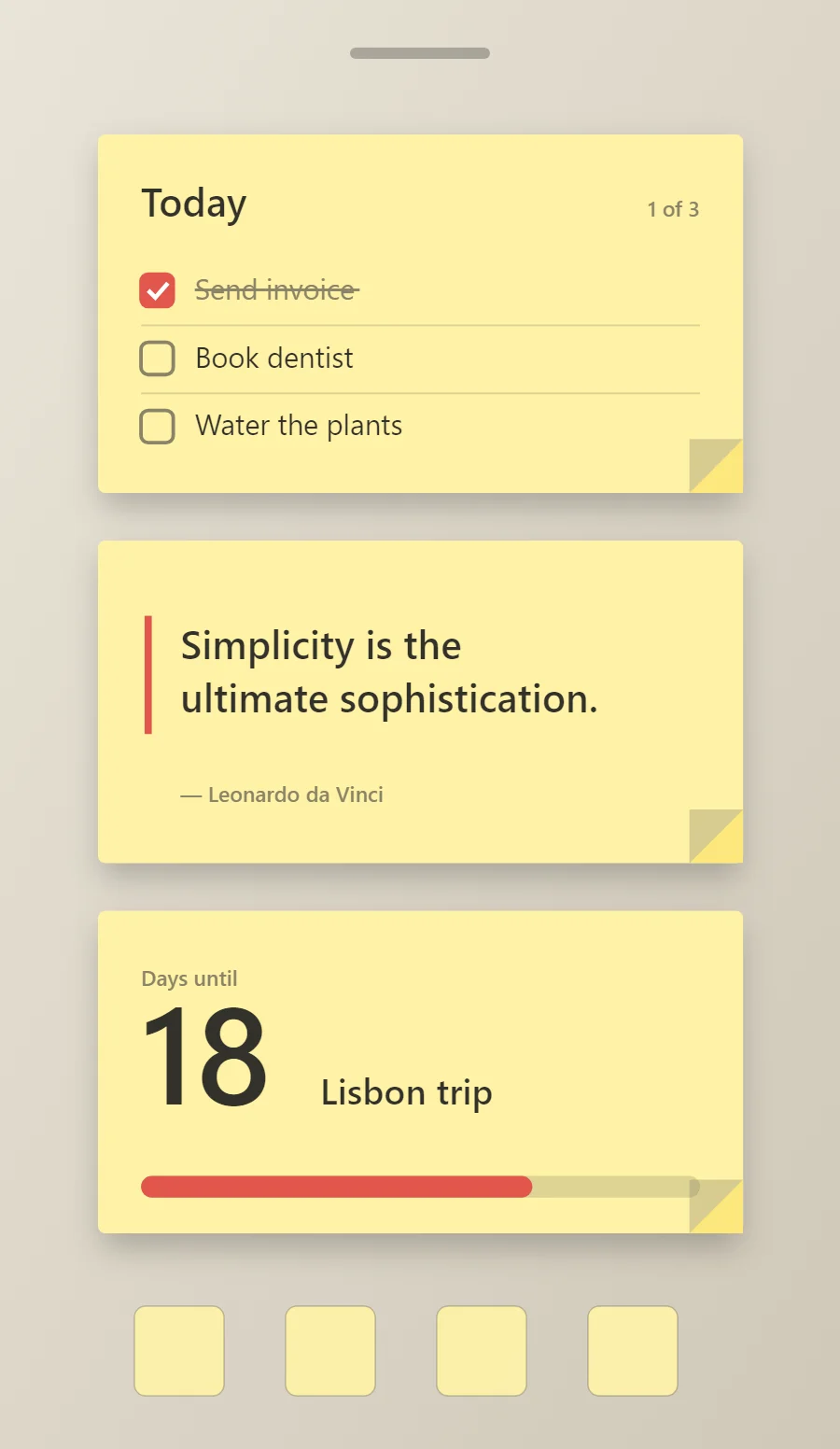
The three paper widgets
- Paper to-do list widget (4 × 2): keeps today's tasks on your home screen with boxes you can tick.
- Paper quote widget (4 × 2): displays a line you want to see every day.
- Paper countdown widget (4 × 2): counts the days left until a date you choose.
Place them top to bottom in that order and leave the row above the dock empty so the wallpaper has room.
To-do list widget settings
A to-do widget works when it is short. Three tasks, a clear title and a box to tap are enough; a long list belongs in an app.
- Canvas: 360 × 200, background #FFF3A6, corner radius 4, soft shadow radius 12 at low opacity
- Text: title "Today", Kalam, size 22, color #33312B
- Text: count such as "1 of 3", size 12, color #8A8468, right aligned
- Lists: Use simple boxes with ticks; keep to four rows.
Free to build. Full recipe and steps.
Quote widget settings
A quote widget is pure typography, so the style shows more clearly here than anywhere else. Line length, line spacing and the size of the quotation mark do the design work.
- Canvas: 360 × 180, background #FFF3A6, corner radius 4, soft shadow radius 12 at low opacity
- Shape: vertical rule 4 points wide in #E2574C at the left of the quote, in place of a quotation mark
- Text: quote in two lines, Kalam, weight 600, size 22, line spacing 1.35, color #33312B, left aligned
- Text: Use graphite-grey text and a casual font.
Free to build. Full recipe and steps.
Countdown widget settings
A countdown widget keeps one date in view: a trip, a birthday, an exam or a launch. The number of days is the hero, the event name gives it meaning and a bar shows how far along you are.
- Canvas: 360 × 180, background #FFF3A6, corner radius 4, soft shadow radius 12 at low opacity
- Layout: stacked: label, number and event name, left aligned
- Text: label "Days until", size 12, color #8A8468
- Numbers: Write the number big with a marker-red underline.
Free to build. Full recipe and steps.
How to set up a paper home screen
- Set the wallpaper first, so you can judge every color against it.
- Build the to-do list widget and add it to the home screen at 4 × 2.
- Duplicate its canvas settings for the quote and countdown widgets so the background, radius and outline match exactly.
- Place all three, then adjust margins until the left edges line up.
- Change the icons last, and remove any app you do not use daily from the page.
Paper wallpaper ideas
A desk, corkboard or plain neutral wallpaper.
Paper icons and dock
Simple flat icons.
Paper home screen colors
- Note yellow
#FFF3A6Background - Fold
#FCE77DSurface and tracks - Graphite
#33312BText - Pencil
#8A8468Labels - Red marker
#E2574CAccent
Fonts for a paper home screen
Use Kalam (import the font file), or the built-in Sans at weight 600. Corner radius is 4 on every widget so the shapes match.
Do and avoid
- Add a soft shadow below the note.
- Keep corners nearly square, like real paper.
- Do not use glossy effects.
- Do not use white text.