 WidgetCraftGet the app
Pastel · Home screen setup
Pastel home screen setup
Pastel widgets use pale pink, mint, lilac and butter yellow with very round corners and soft type. They feel light and friendly and work well for moods, music and small daily notes. This setup uses three widgets, one wallpaper and one palette so the whole screen reads as a single design.
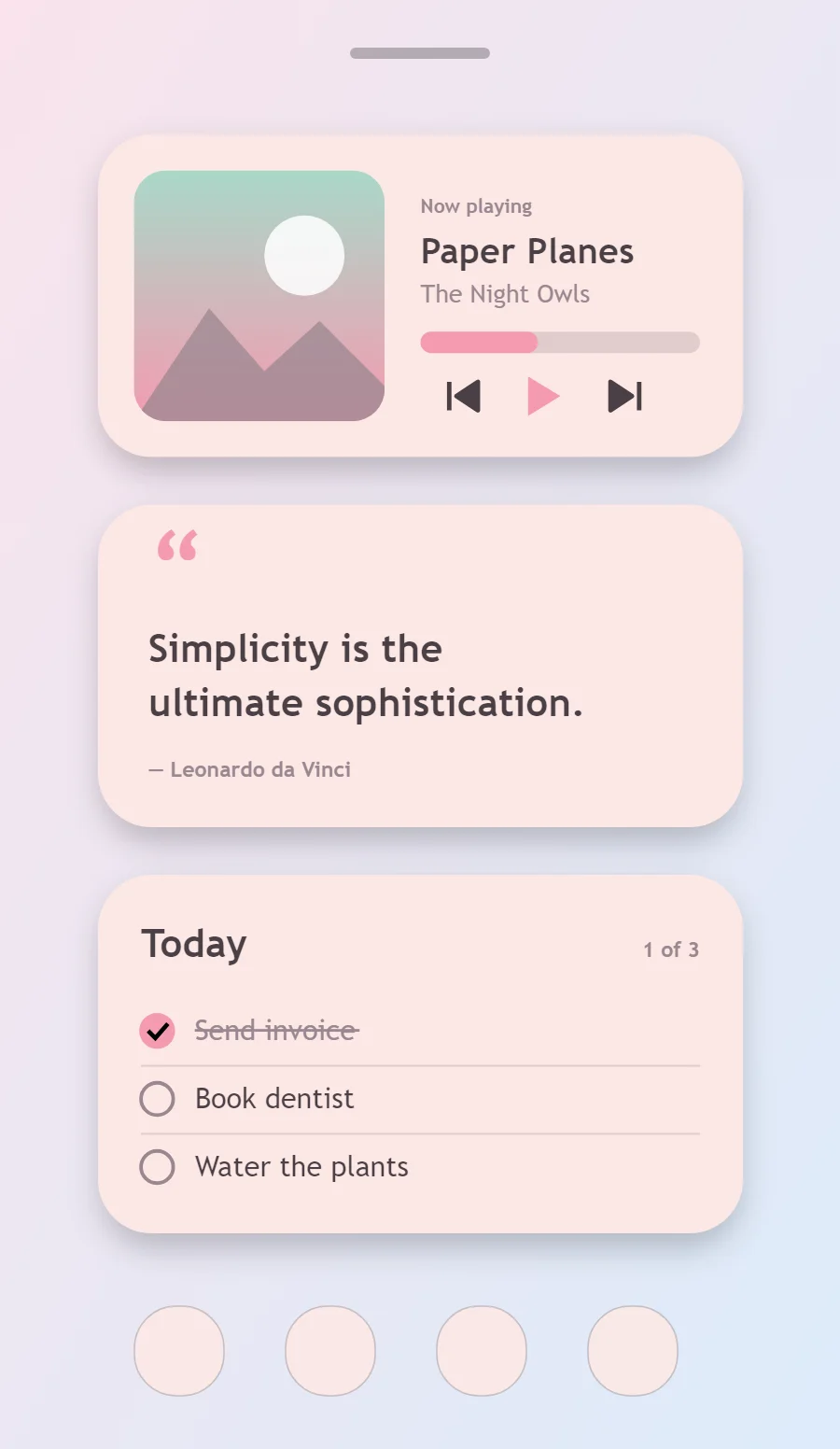
The three pastel widgets
- Pastel music widget (4 × 2): shows the song that is playing with play, pause and skip controls.
- Pastel quote widget (4 × 2): displays a line you want to see every day.
- Pastel to-do list widget (4 × 2): keeps today's tasks on your home screen with boxes you can tick.
Place them top to bottom in that order and leave the row above the dock empty so the wallpaper has room.
Music player widget settings
A now-playing widget shows cover art, the track and artist, a progress line and three controls. It works with whichever app is playing, not one particular service.
- Canvas: 360 × 180, background #FCE8E6, corner radius 30, soft shadow radius 12 at low opacity
- Image: cover art 140 × 140, radius 18, connected to media artwork
- Text: track title, Nunito, size 20, color #4A3F45, one line
- Photos: Round photo corners generously and add a pale border in a matching tint.
Styling is free; the live data needs Pro. Full recipe and steps.
Quote widget settings
A quote widget is pure typography, so the style shows more clearly here than anywhere else. Line length, line spacing and the size of the quotation mark do the design work.
- Canvas: 360 × 180, background #FCE8E6, corner radius 30, soft shadow radius 12 at low opacity
- Text: opening quotation mark, size 54, color #F49AB0
- Text: quote in two lines, Nunito, weight 700, size 22, line spacing 1.35, color #4A3F45, left aligned
- Text: Use a rounded sans in a dark cocoa tone instead of black so it stays soft.
Free to build. Full recipe and steps.
To-do list widget settings
A to-do widget works when it is short. Three tasks, a clear title and a box to tap are enough; a long list belongs in an app.
- Canvas: 360 × 200, background #FCE8E6, corner radius 30, soft shadow radius 12 at low opacity
- Text: title "Today", Nunito, size 22, color #4A3F45
- Text: count such as "1 of 3", size 12, color #9A8790, right aligned
- Lists: Use round checkboxes and give each row a soft tinted pill behind it.
Free to build. Full recipe and steps.
How to set up a pastel home screen
- Set the wallpaper first, so you can judge every color against it.
- Build the music widget and add it to the home screen at 4 × 2.
- Duplicate its canvas settings for the quote and to-do list widgets so the background, radius and outline match exactly.
- Place all three, then adjust margins until the left edges line up.
- Change the icons last, and remove any app you do not use daily from the page.
Pastel wallpaper ideas
A soft gradient between two pastel tints or a pale cloud photo.
Pastel icons and dock
Pastel icon packs or white glyphs on tinted circles.
Pastel home screen colors
- Blush
#FCE8E6Background - Rose milk
#F7D6D9Surface and tracks - Cocoa
#4A3F45Text - Mauve grey
#9A8790Labels - Candy pink
#F49AB0Accent
Fonts for a pastel home screen
Use Nunito (import the font file), or the built-in Sans at weight 700. Corner radius is 30 on every widget so the shapes match.
Do and avoid
- Use corner radius of 28 or more.
- Choose text in dark brown or plum, not pure black.
- Do not use more than three tints in one widget.
- Do not use thin hairlines; they look harsh here.