 WidgetCraftGet the app
Space · Photo · 4 × 2 widget
Space photo widget
A space photo widget frames a favorite picture with a short caption. Deep navy skies, star dots and soft purple nebula tones. This page gives the exact colors, type settings and layers, with a preview drawn from the same values.
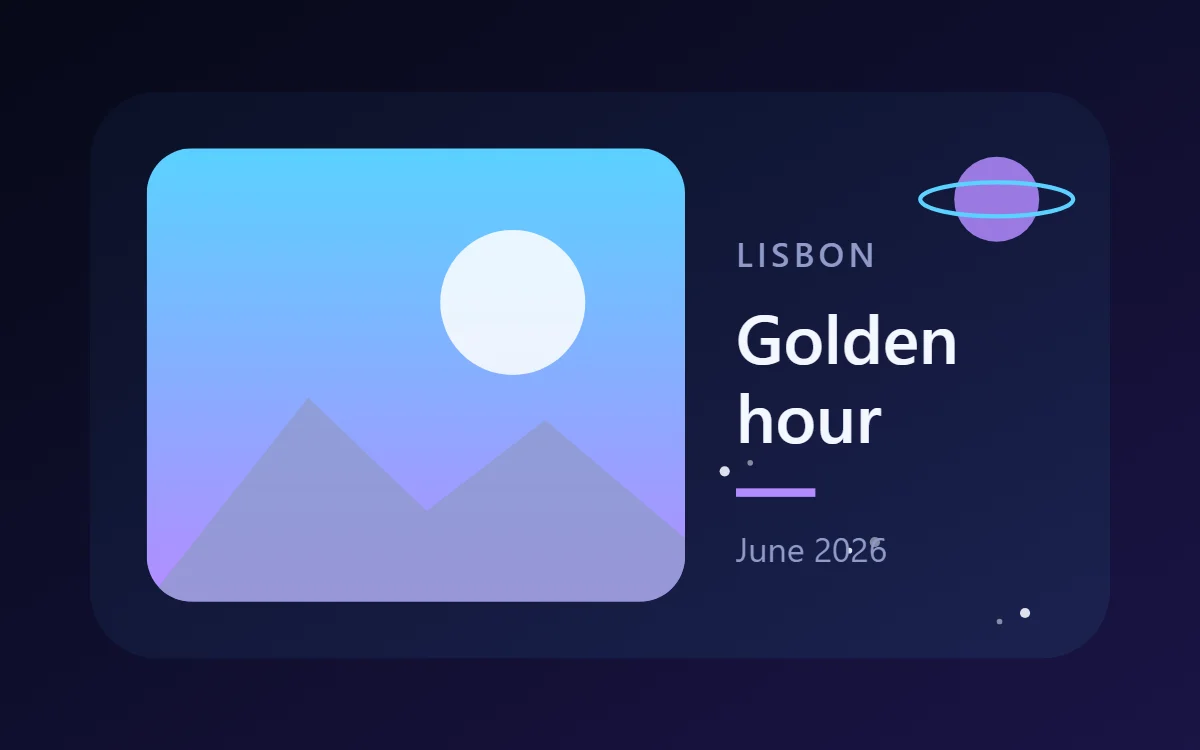
What a space photo widget shows
A photo widget puts a person, place or pet on the home screen without making it the wallpaper. The frame, the crop and the caption decide whether it feels designed or just pasted in.
You pick the picture with Android's photo picker, so WidgetCraft needs no storage permission, and the photo stays on your phone. It is a free element.
How the space style shapes it
Space widgets use deep navy and violet with white text and tiny star dots. Circles become planets and orbits, which suits clocks, countdowns and step rings.
- Photos: Use star or planet photos and keep them dark.
- Text: Use white capitals with wide spacing, like mission labels.
Space photo widget recipe
| Layer | Settings |
|---|---|
| Canvas | 360 × 200, background gradient #0B1026 to #1B2250 at 45°, corner radius 24 |
| Layout | photo on the left, caption on the right |
| Image | 190 × 160, corner radius 16, crop to fill |
| Text | place label, size 12, color #8F9AC9 |
| Text | caption in two lines, Space Grotesk, size 24, color #F4F6FF |
| Shape | rule 28 × 3 in #B38BFF |
| Text | date, size 12, color #8F9AC9 |
| Ornament | a small violet planet (circle) with a thin ring (ellipse outline) in the top right, and a dozen tiny white dots as stars |
| Font | Space Grotesk (import the font file), or the built-in Sans |
| Home screen size | 4 × 2 cells |
Space color palette
- Deep space
#0B1026Background - Nebula blue
#1B2250Surface and tracks - Starlight
#F4F6FFText - Dust
#8F9AC9Labels - Violet
#B38BFFAccent
How to make a space photo widget in WidgetCraft
- Create a widget and open Canvas. Set the size to 360 × 200, the background to gradient #0B1026 to #1B2250 at 45° and the corner radius to 24.
- Tap Add and choose Image. Pick your photo, size it to 190 × 160 and set crop to fill.
- Set the image corner radius to 16. Drag the crop so the subject is centered.
- Add a Text caption at size 24 in #F4F6FF using Space Grotesk.
- Add a small place label above and a date below, both at size 12 in #8F9AC9, with a short rule in #B38BFF between them.
- Add the space ornament with Shape layers and move them below the other layers in Layers: a small violet planet (circle) with a thin ring (ellipse outline) in the top right, and a dozen tiny white dots as stars.
- Tap Save, then Add to home screen and resize the widget on your launcher if needed.
Everything in this recipe works in the free version.
Tips for space photo widgets
- Use a gradient from navy to violet.
- Add a few small white circles as stars.
- Choose a photo whose subject sits in the middle; widgets crop the edges.
- Portrait photos suit 2 × 2 or tall widgets better than wide ones.
- Very large images make widgets slow; let the app resize the photo when asked.
- Do not use bright daytime colors.
- Do not overfill; space needs emptiness.
Questions about the space photo widget
What size is a space photo widget?
It is designed for 4 × 2 home screen cells on a 360 × 200 canvas. You can resize it on the launcher and the design scales in proportion.
Which colors does it use?
Deep space (#0B1026) for the background, Starlight (#F4F6FF) for the main text, Dust (#8F9AC9) for labels and Violet (#B38BFF) as the accent.
Is it free to make?
Yes. Photo widgets use free features in WidgetCraft, and the space styling is free too.
What else is this style called?
People also search for galaxy photo widget, astronomy photo widget, night sky photo widget, cosmic photo widget. They describe the same look as this space photo widget.
More space widgets
- Space clock widget
- Space analog clock widget
- Space calendar widget
- Space battery widget
- Space countdown widget
- Space to-do list widget
- Space quote widget
- Space music widget
- Space year progress widget
- Space step counter widget
- Space habit tracker widget
- Space sticky note widget
- Space world clock widget
- Space date widget
- Space home screen setup
- All space widgets