 WidgetCraftGet the app
Swiss · World clock · 4 × 2 widget
Swiss world clock widget
A Swiss world clock widget shows the time in three cities side by side. Grid-based typography in black, white and red. This page gives the exact colors, type settings and layers, with a preview drawn from the same values.
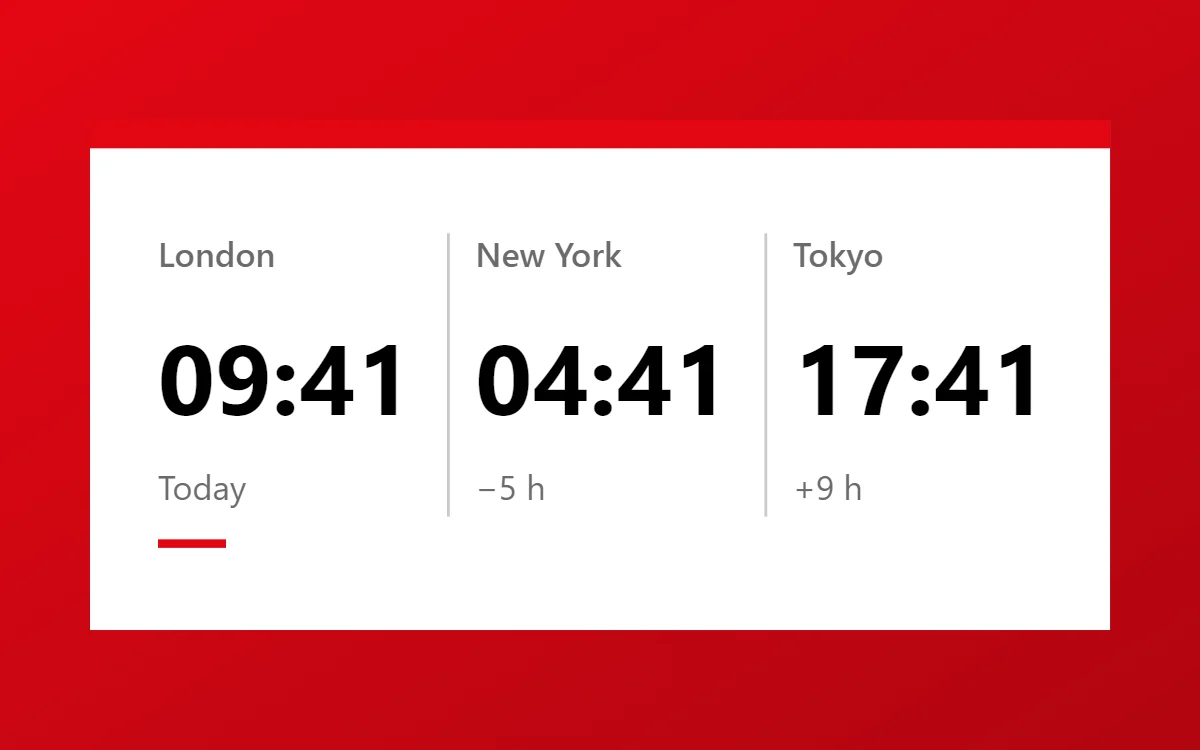
What a Swiss world clock widget shows
A world clock widget is for anyone with family, friends or colleagues in another time zone. Three cities in columns, each with its time and a day hint, answer "is it too late to call?" at a glance.
Each clock layer in WidgetCraft can use its own time zone, chosen by city. It is free, works offline and needs no permission; daylight saving is handled automatically.
How the Swiss style shapes it
Swiss style, also called International Typographic Style, relies on a strict grid, a neutral sans, left alignment and strong size contrast, usually in black, white and red.
- Numbers: Make the number very large and tight, aligned to the left grid line.
- Text: Use one neutral sans, left-aligned, in two sizes only.
Swiss world clock widget recipe
| Layer | Settings |
|---|---|
| Canvas | 360 × 180, background #FFFFFF, corner radius 0 |
| Text | city names, size 12, color #6B6B6B |
| Clock × 3 | format HH:mm, Inter, size 35, color #000000, each set to its own time zone |
| Text | offset such as "+9 h", size 12, color #6B6B6B |
| Shapes | two vertical dividers in #6B6B6B at 35% opacity, and a short #E30613 rule under your home city |
| Ornament | a solid red bar, 10 points tall, across the full width at the top |
| Font | Inter (import the font file), or the built-in Sans |
| Home screen size | 4 × 2 cells |
Swiss color palette
- White
#FFFFFFBackground - Grid grey
#F1F1F1Surface and tracks - Black
#000000Text - Grey
#6B6B6BLabels - Swiss red
#E30613Accent
How to make a Swiss world clock widget in WidgetCraft
- Create a widget and open Canvas. Set the size to 360 × 180, the background to #FFFFFF and the corner radius to 0.
- Tap Add and choose Clock. Set the format to hours and minutes, the font to Inter, the size to 35 and the color to #000000.
- Duplicate the clock twice and space the three about 112 apart. Open each copy's details, choose Time zone and pick its city.
- Add a Text label above each clock with the city name at size 12 in #6B6B6B, and the offset below it.
- Add thin Shape dividers between the columns and a short rule in #E30613 under your own city.
- Add the Swiss ornament with Shape layers and move them below the other layers in Layers: a solid red bar, 10 points tall, across the full width at the top.
- Tap Save, then Add to home screen and resize the widget on your launcher if needed.
Everything in this recipe works in the free version.
Tips for Swiss world clock widgets
- Align everything to the same left margin.
- Use red for one element only.
- Three cities fit a 4 × 2 widget; four make the numbers too small.
- Add the day offset, such as "+1 day", when a city is already tomorrow.
- Put your own city first so the others read relative to it.
- Do not center text.
- Do not use decorative fonts.
Questions about the Swiss world clock widget
What size is a Swiss world clock widget?
It is designed for 4 × 2 home screen cells on a 360 × 180 canvas. You can resize it on the launcher and the design scales in proportion.
Which colors does it use?
White (#FFFFFF) for the background, Black (#000000) for the main text, Grey (#6B6B6B) for labels and Swiss red (#E30613) as the accent.
Is it free to make?
Yes. World clock widgets use free features in WidgetCraft, and the Swiss styling is free too.
What else is this style called?
People also search for typographic world clock widget, grid world clock widget, helvetica style world clock widget, international style world clock widget. They describe the same look as this Swiss world clock widget.
More Swiss widgets
- Swiss clock widget
- Swiss analog clock widget
- Swiss calendar widget
- Swiss battery widget
- Swiss countdown widget
- Swiss to-do list widget
- Swiss photo widget
- Swiss quote widget
- Swiss music widget
- Swiss year progress widget
- Swiss step counter widget
- Swiss habit tracker widget
- Swiss sticky note widget
- Swiss date widget
- Swiss home screen setup
- All Swiss widgets