 WidgetCraftGet the app
Minimal · World clock · 4 × 2 widget
Minimal world clock widget
A minimal world clock widget shows the time in three cities side by side. Quiet layouts, one accent color and plenty of empty space. This page gives the exact colors, type settings and layers, with a preview drawn from the same values.
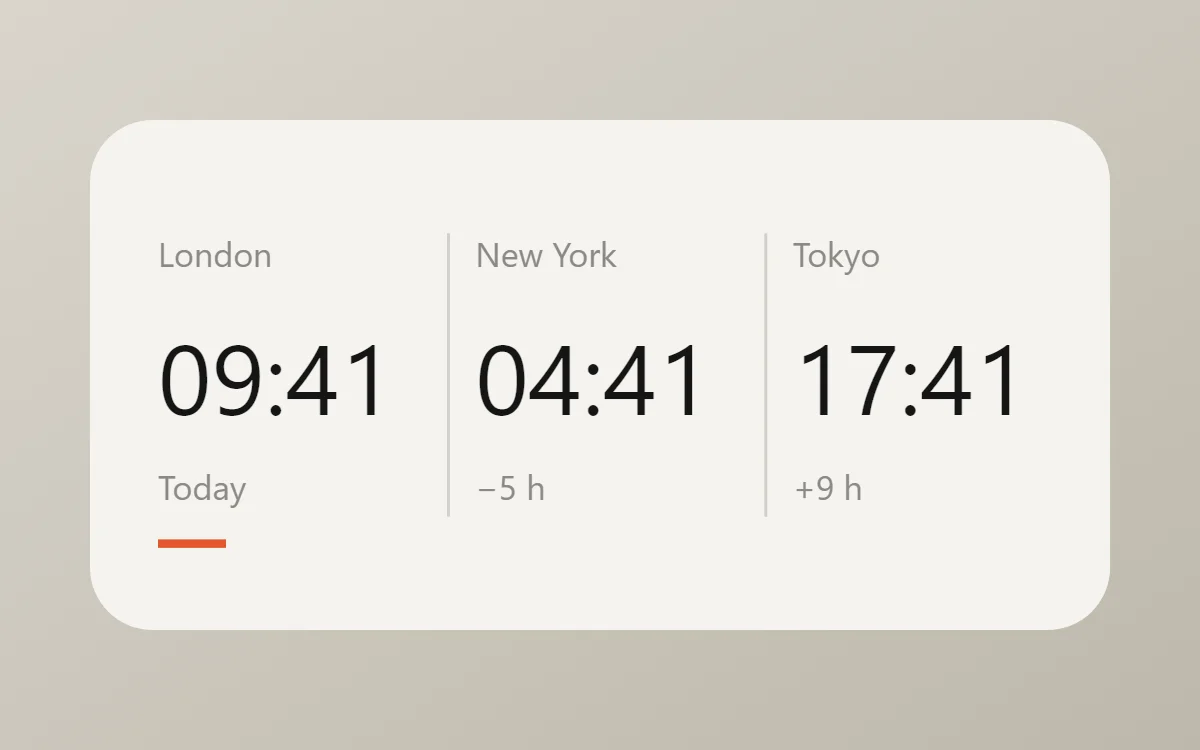
What a minimal world clock widget shows
A world clock widget is for anyone with family, friends or colleagues in another time zone. Three cities in columns, each with its time and a day hint, answer "is it too late to call?" at a glance.
Each clock layer in WidgetCraft can use its own time zone, chosen by city. It is free, works offline and needs no permission; daylight saving is handled automatically.
How the minimal style shapes it
Minimal widgets remove everything that is not information. One typeface, two or three colors, generous margins and no decoration, so the time or the task is the only thing you see.
- Numbers: Give the main number at least half the widget height and keep everything else under 14 points.
- Text: Set labels small and regular weight; let size, not boldness, carry the hierarchy.
Minimal world clock widget recipe
| Layer | Settings |
|---|---|
| Canvas | 360 × 180, background #F5F3EE, corner radius 22 |
| Text | city names, size 12, color #8B8A85 |
| Clock × 3 | format HH:mm, built-in Sans, size 35, color #151515, each set to its own time zone |
| Text | offset such as "+9 h", size 12, color #8B8A85 |
| Shapes | two vertical dividers in #8B8A85 at 35% opacity, and a short #E4572E rule under your home city |
| Font | built-in Sans |
| Home screen size | 4 × 2 cells |
Minimal color palette
- Paper
#F5F3EEBackground - Linen
#E9E6DFSurface and tracks - Ink
#151515Text - Stone
#8B8A85Labels - Signal
#E4572EAccent
How to make a minimal world clock widget in WidgetCraft
- Create a widget and open Canvas. Set the size to 360 × 180, the background to #F5F3EE and the corner radius to 22.
- Tap Add and choose Clock. Set the format to hours and minutes, the font to built-in Sans, the size to 35 and the color to #151515.
- Duplicate the clock twice and space the three about 112 apart. Open each copy's details, choose Time zone and pick its city.
- Add a Text label above each clock with the city name at size 12 in #8B8A85, and the offset below it.
- Add thin Shape dividers between the columns and a short rule in #E4572E under your own city.
- Tap Save, then Add to home screen and resize the widget on your launcher if needed.
Everything in this recipe works in the free version.
Tips for minimal world clock widgets
- Leave at least 20 points of margin on every side.
- Pick one accent color and use it once per widget.
- Three cities fit a 4 × 2 widget; four make the numbers too small.
- Add the day offset, such as "+1 day", when a city is already tomorrow.
- Put your own city first so the others read relative to it.
- Do not add icons next to every label.
- Do not mix more than two text sizes below the headline.
Ready-made Minimalist templates
WidgetCraft includes a Minimalist template pack you can import and edit instead of starting from a blank canvas.
Questions about the minimal world clock widget
What size is a minimal world clock widget?
It is designed for 4 × 2 home screen cells on a 360 × 180 canvas. You can resize it on the launcher and the design scales in proportion.
Which colors does it use?
Paper (#F5F3EE) for the background, Ink (#151515) for the main text, Stone (#8B8A85) for labels and Signal (#E4572E) as the accent.
Is it free to make?
Yes. World clock widgets use free features in WidgetCraft, and the minimal styling is free too.
What else is this style called?
People also search for minimalist world clock widget, clean world clock widget, simple world clock widget. They describe the same look as this minimal world clock widget.
More minimal widgets
- Minimal clock widget
- Minimal analog clock widget
- Minimal calendar widget
- Minimal battery widget
- Minimal countdown widget
- Minimal to-do list widget
- Minimal photo widget
- Minimal quote widget
- Minimal music widget
- Minimal year progress widget
- Minimal step counter widget
- Minimal habit tracker widget
- Minimal sticky note widget
- Minimal date widget
- Minimal home screen setup
- All minimal widgets