 WidgetCraftGet the app
Aesthetic · Home screen setup
Aesthetic home screen setup
The aesthetic look is a curated mood board: muted beige and brown tones, a favorite photo, a lowercase caption and lots of soft space. Every widget shares one palette so the screen feels like a single design. This setup uses three widgets, one wallpaper and one palette so the whole screen reads as a single design.
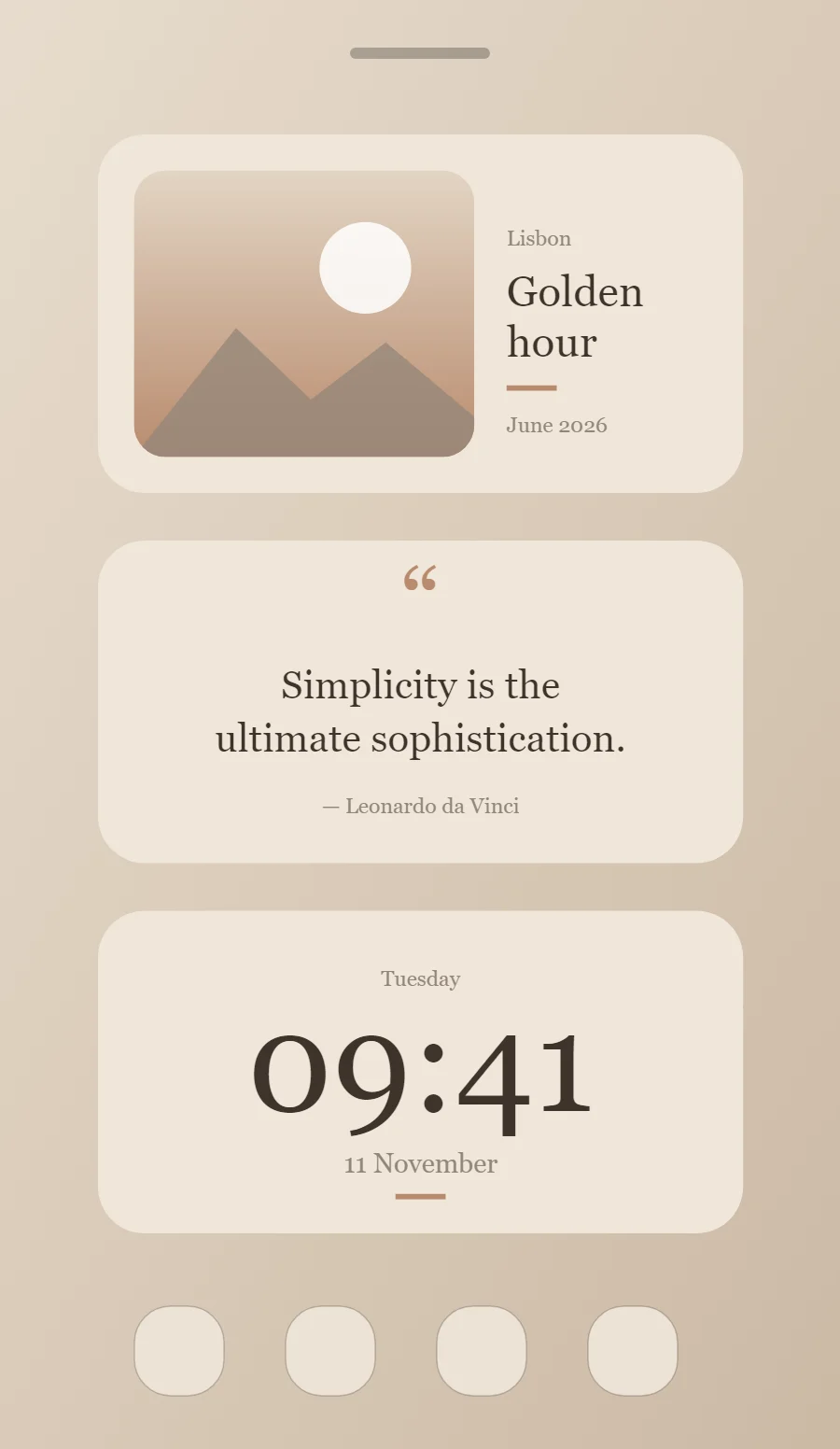
The three aesthetic widgets
- Aesthetic photo widget (4 × 2): frames a favorite picture with a short caption.
- Aesthetic quote widget (4 × 2): displays a line you want to see every day.
- Aesthetic clock widget (4 × 2): shows the time in large numerals with the day and date beneath.
Place them top to bottom in that order and leave the row above the dock empty so the wallpaper has room.
Photo widget settings
A photo widget puts a person, place or pet on the home screen without making it the wallpaper. The frame, the crop and the caption decide whether it feels designed or just pasted in.
- Canvas: 360 × 200, background #EFE6DA, corner radius 26
- Layout: photo on the left, caption on the right
- Image: 190 × 160, corner radius 18, crop to fill
- Photos: Let a warm, slightly faded photo take most of the widget and round its corners.
Free to build. Full recipe and steps.
Quote widget settings
A quote widget is pure typography, so the style shows more clearly here than anywhere else. Line length, line spacing and the size of the quotation mark do the design work.
- Canvas: 360 × 180, background #EFE6DA, corner radius 26
- Text: opening quotation mark, size 54, color #B98B6E
- Text: quote in two lines, Cormorant Garamond, weight 500, size 22, line spacing 1.35, color #3D332B, center aligned
- Text: Write captions in lowercase and keep them short, like a note on a photo.
Free to build. Full recipe and steps.
Clock widget settings
A digital clock is the widget most people place first. It needs to be readable from arm's length, so the time takes most of the space and the date sits quietly below it.
- Canvas: 360 × 180, background #EFE6DA, corner radius 26
- Layout: stacked: weekday, time, then date, all center aligned
- Text or Date: weekday, Cormorant Garamond, size 12, color #93867A
- Numbers: Set numbers in a light serif and center them with a tiny label below.
Free to build. Full recipe and steps.
How to set up an aesthetic home screen
- Set the wallpaper first, so you can judge every color against it.
- Build the photo widget and add it to the home screen at 4 × 2.
- Duplicate its canvas settings for the quote and clock widgets so the background, radius and outline match exactly.
- Place all three, then adjust margins until the left edges line up.
- Change the icons last, and remove any app you do not use daily from the page.
Aesthetic wallpaper ideas
A warm neutral photo such as linen, coffee, dried flowers or soft shadows on a wall.
Aesthetic icons and dock
Beige or brown minimalist icon packs; hide labels for a cleaner grid.
Aesthetic home screen colors
- Oat
#EFE6DABackground - Latte
#E2D5C4Surface and tracks - Espresso
#3D332BText - Taupe
#93867ALabels - Caramel
#B98B6EAccent
Fonts for an aesthetic home screen
Use Cormorant Garamond (import the font file), or the built-in Serif at weight 500. Corner radius is 26 on every widget so the shapes match.
Do and avoid
- Pick four colors from one photo and reuse them on every widget.
- Center text and leave wide margins.
- Do not mix saturated colors into the palette.
- Do not use capitals for long text.