 WidgetCraftGet the app
Beige · Home screen setup
Beige home screen setup
Beige widgets use warm neutrals: cream backgrounds, soft brown text and a caramel accent. They are the base of most aesthetic home screens. This setup uses three widgets, one wallpaper and one palette so the whole screen reads as a single design.
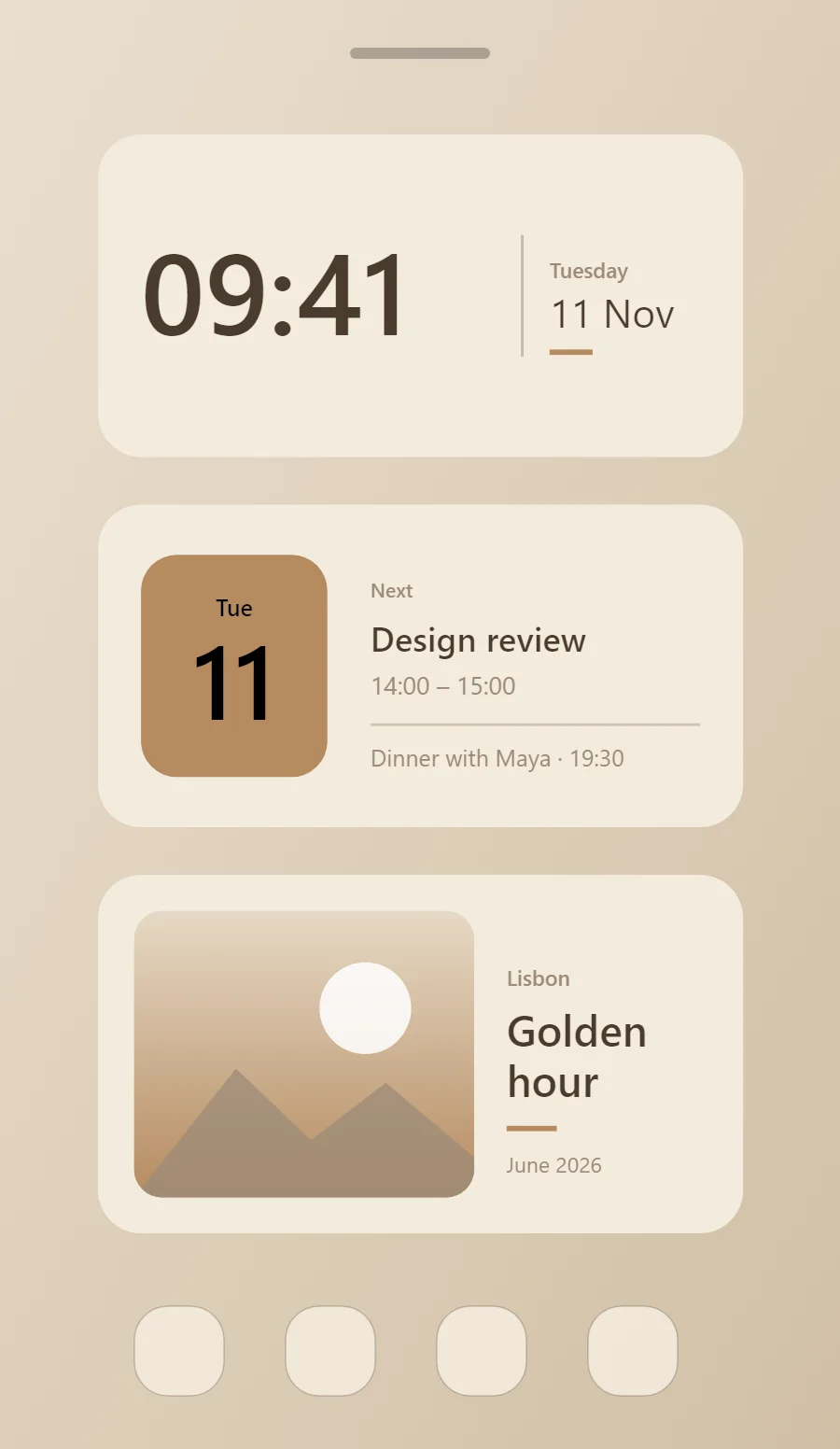
The three beige widgets
- Beige clock widget (4 × 2): shows the time in large numerals with the day and date beneath.
- Beige calendar widget (4 × 2): shows today's date beside your next event.
- Beige photo widget (4 × 2): frames a favorite picture with a short caption.
Place them top to bottom in that order and leave the row above the dock empty so the wallpaper has room.
Clock widget settings
A digital clock is the widget most people place first. It needs to be readable from arm's length, so the time takes most of the space and the date sits quietly below it.
- Canvas: 360 × 180, background #F3EBDD, corner radius 24
- Layout: split: the time on the left at size 64, a thin divider at x 236, and the weekday and date stacked in a column on the right
- Text or Date: weekday, built-in Sans, size 12, color #9C8B78
- Numbers: Keep numbers cocoa and medium weight.
Free to build. Full recipe and steps.
Calendar widget settings
A calendar widget answers two questions: what day is it, and what is next. The date sits in a bold block on the left and the next event takes the right side.
- Canvas: 360 × 180, background #F3EBDD, corner radius 24
- Shape: date block 104 × 124, radius 20, fill #B58A60
- Date: weekday (size 13) and day number (size 58) centered on the block, color #000000
- Numbers: Keep numbers cocoa and medium weight.
Styling is free; the live data needs Pro. Full recipe and steps.
Photo widget settings
A photo widget puts a person, place or pet on the home screen without making it the wallpaper. The frame, the crop and the caption decide whether it feels designed or just pasted in.
- Canvas: 360 × 200, background #F3EBDD, corner radius 24
- Layout: photo on the left, caption on the right
- Image: 190 × 160, corner radius 16, crop to fill
- Photos: Warm, faded photos fit best.
Free to build. Full recipe and steps.
How to set up a beige home screen
- Set the wallpaper first, so you can judge every color against it.
- Build the clock widget and add it to the home screen at 4 × 2.
- Duplicate its canvas settings for the calendar and photo widgets so the background, radius and outline match exactly.
- Place all three, then adjust margins until the left edges line up.
- Change the icons last, and remove any app you do not use daily from the page.
Beige wallpaper ideas
Linen, sand or a warm blurred photo.
Beige icons and dock
Beige or brown icon packs.
Beige home screen colors
- Cream
#F3EBDDBackground - Oat
#E6D9C5Surface and tracks - Cocoa
#4A3B2EText - Taupe
#9C8B78Labels - Caramel
#B58A60Accent
Fonts for a beige home screen
Use built-in Sans at weight 500. Corner radius is 24 on every widget so the shapes match.
Do and avoid
- Keep every color warm.
- Use caramel as the only accent.
- Do not use cool greys.
- Do not use pure white.