 WidgetCraftGet the app
Bauhaus · Home screen setup
Bauhaus home screen setup
Bauhaus widgets are built from basic shapes in red, yellow and blue on an off-white ground. Circles become dials, bars become progress and type stays geometric and plain. This setup uses three widgets, one wallpaper and one palette so the whole screen reads as a single design.
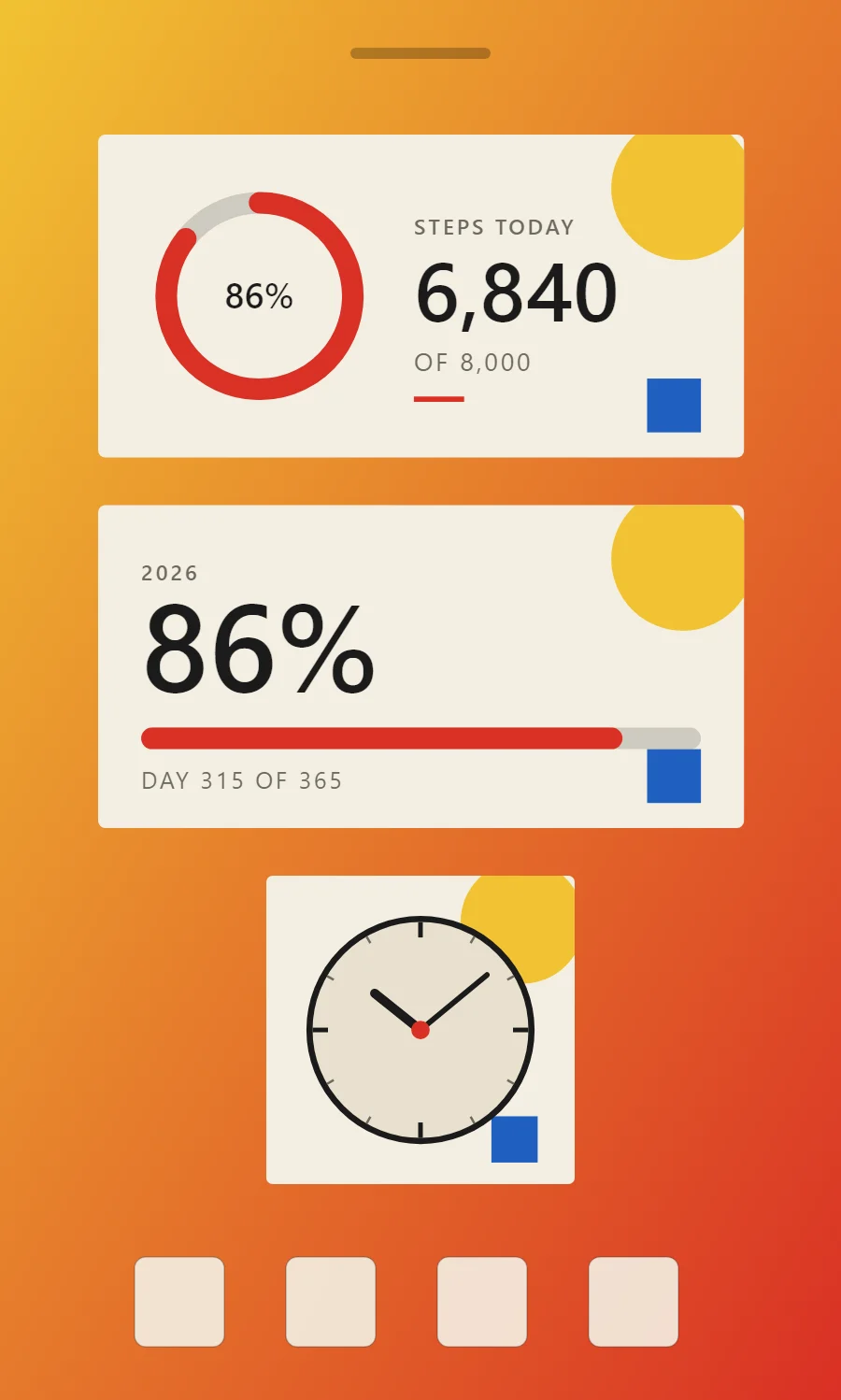
The three Bauhaus widgets
- Bauhaus step counter widget (4 × 2): shows today's steps against your goal.
- Bauhaus year progress widget (4 × 2): shows how much of the year has passed as a percentage and a bar.
- Bauhaus analog clock widget (2 × 2): shows the time on a round dial with hour and minute hands.
Place them top to bottom in that order and leave the row above the dock empty so the wallpaper has room.
Step counter widget settings
A step widget shows one number and how close it is to a goal. A ring on one side and the count on the other reads well at a glance.
- Canvas: 360 × 180, background #F4EFE3, corner radius 4
- Ring: diameter 104, stroke 12, progress #D93025, range 0 to your goal
- Text: percentage inside the ring, size 20, color #1B1B1B
- Bars and rings: Build the whole widget from a circle, a square and a bar, each in a different primary color.
Styling is free; the live data needs Pro. Full recipe and steps.
Year progress widget settings
A year-progress widget is a gentle nudge: one bar that fills from 1 January to 31 December. The same layout works for the day, the week or a personal goal.
- Canvas: 360 × 180, background #F4EFE3, corner radius 4
- Text: year label, size 12, color #6D6A62
- Text (formula): percentage of the year, Josefin Sans, size 68, color #1B1B1B
- Bars and rings: Build the whole widget from a circle, a square and a bar, each in a different primary color.
Free to build. Full recipe and steps.
Analog clock widget settings
An analog clock reads as a shape rather than as numbers, which makes it the most decorative way to show the time. WidgetCraft has a dedicated analog layer where the dial, markers and each hand can be styled separately.
- Canvas: 200 × 200, background #F4EFE3, corner radius 4
- Analog: dial #E8E0CE, ring 4 pt in #1B1B1B
- Markers: 12 ticks, quarter-hours in #1B1B1B (3 pt), others in #6D6A62 (1.5 pt)
- Bars and rings: Build the whole widget from a circle, a square and a bar, each in a different primary color.
Free to build. Full recipe and steps.
How to set up a Bauhaus home screen
- Set the wallpaper first, so you can judge every color against it.
- Build the step counter widget and add it to the home screen at 4 × 2.
- Duplicate its canvas settings for the year progress and analog clock widgets so the background, radius and outline match exactly.
- Place all three, then adjust margins until the left edges line up.
- Change the icons last, and remove any app you do not use daily from the page.
Bauhaus wallpaper ideas
A cream or solid primary-color wallpaper, or a simple geometric composition.
Bauhaus icons and dock
Use flat geometric icons, ideally in the same three primary colors.
Bauhaus home screen colors
- Canvas
#F4EFE3Background - Cream
#E8E0CESurface and tracks - Black
#1B1B1BText - Graphite
#6D6A62Labels - Signal red
#D93025Accent
Fonts for a Bauhaus home screen
Use Josefin Sans (import the font file), or the built-in Sans at weight 600, with labels in capitals. Corner radius is 4 on every widget so the shapes match.
Do and avoid
- Limit color to red, yellow, blue, black and cream.
- Let one large shape dominate each widget.
- Do not use gradients or shadows.
- Do not round shapes halfway; use full circles or square corners.