 WidgetCraftGet the app
Coquette · Home screen setup
Coquette home screen setup
Coquette widgets are delicate and romantic: ballet pink and cream, a deep rose for text, small ribbon bows, lace-like edges and an elegant italic serif. This setup uses three widgets, one wallpaper and one palette so the whole screen reads as a single design.
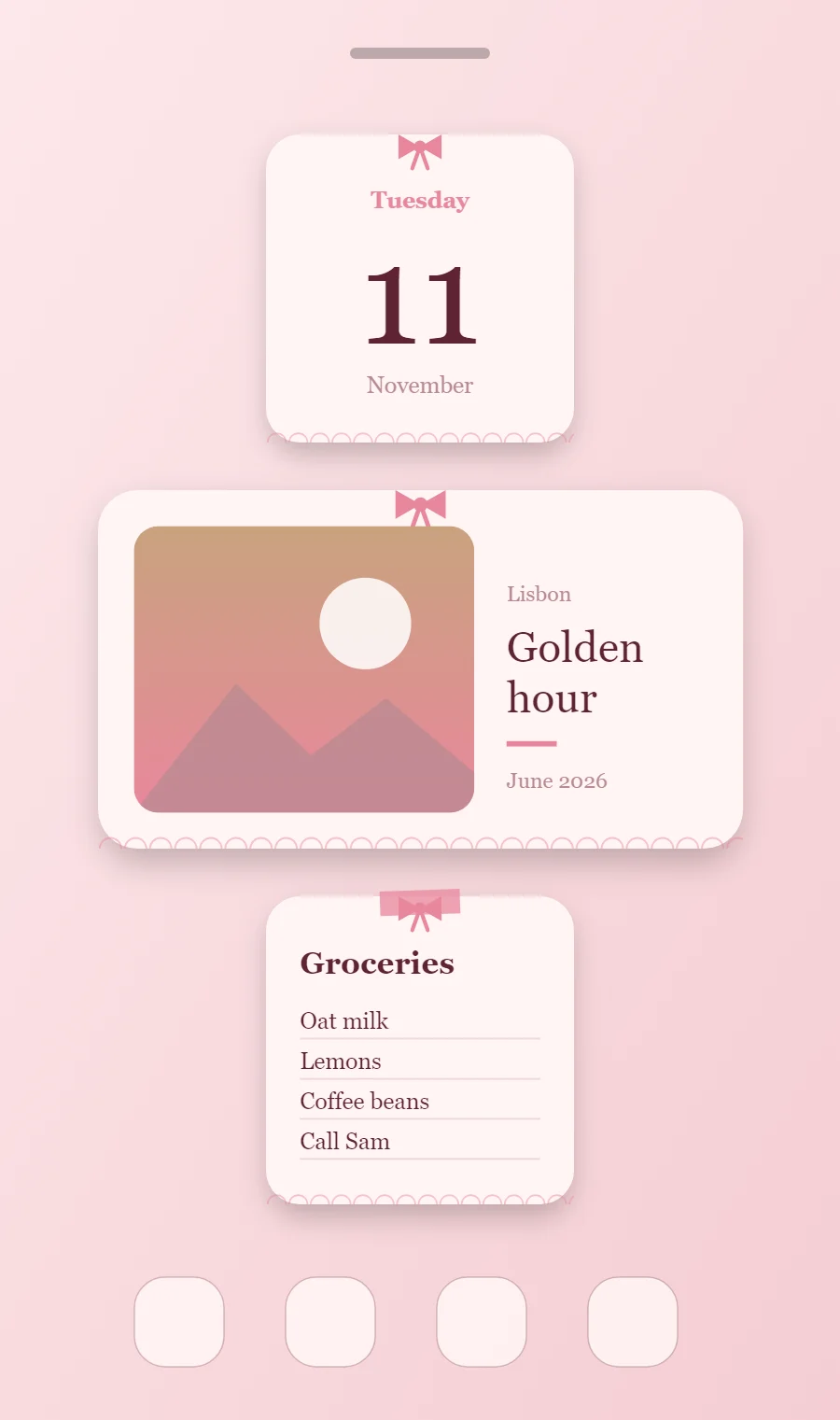
The three coquette widgets
- Coquette date widget (2 × 2): shows the weekday, a large day number and the month.
- Coquette photo widget (4 × 2): frames a favorite picture with a short caption.
- Coquette sticky note widget (2 × 2): keeps a short note or list on your home screen like a sticky note.
Place them top to bottom in that order and leave the row above the dock empty so the wallpaper has room.
Date widget settings
A date widget is the calm alternative to a clock: one large number for the day, with the weekday above and the month below. It suits small 2 × 2 spaces and pairs well with a clock elsewhere on the screen.
- Canvas: 200 × 200, background #FFF4F4, corner radius 22, soft shadow radius 12 at low opacity
- Date: weekday (pattern EEEE), size 15, color #E8879C, centered
- Date: day number (pattern d), Playfair Display, weight 500, size 92, color #5E2433
- Numbers: Set numbers in the serif at a medium weight, never heavy.
Free to build. Full recipe and steps.
Photo widget settings
A photo widget puts a person, place or pet on the home screen without making it the wallpaper. The frame, the crop and the caption decide whether it feels designed or just pasted in.
- Canvas: 360 × 200, background #FFF4F4, corner radius 22, soft shadow radius 12 at low opacity
- Layout: photo on the left, caption on the right
- Image: 190 × 160, corner radius 14, crop to fill
- Photos: Use soft, slightly faded photos with a cream border and rounded corners.
Free to build. Full recipe and steps.
Sticky note widget settings
A sticky note widget holds a few words you need to see: a shopping list, a reminder, a phone number. It works best short, with a bold title and three or four lines.
- Canvas: 200 × 200, background #FFF4F4, corner radius 22, soft shadow radius 12 at low opacity
- Shape: "tape" strip 52 × 16 at the top center in #E8879C at 75% opacity, rotated 2°
- Text: title, Playfair Display, size 20, color #5E2433
- Text: Use an italic serif for titles and keep labels small in mauve.
Free to build. Full recipe and steps.
How to set up a coquette home screen
- Set the wallpaper first, so you can judge every color against it.
- Build the date widget and add it to the home screen at 2 × 2.
- Duplicate its canvas settings for the photo and sticky note widgets so the background, radius and outline match exactly.
- Place all three, then adjust margins until the left edges line up.
- Change the icons last, and remove any app you do not use daily from the page.
Coquette wallpaper ideas
Pink satin, pearls, lace or a pale pink floral wallpaper.
Coquette icons and dock
Pink or cream icon packs with thin lines; bows on a few icons work well.
Coquette home screen colors
- Cream
#FFF4F4Background - Ballet pink
#FBE1E4Surface and tracks - Wine
#5E2433Text - Mauve
#B88A92Labels - Ribbon pink
#E8879CAccent
Fonts for a coquette home screen
Use Playfair Display (import the font file), or the built-in Serif at weight 500. Corner radius is 22 on every widget so the shapes match.
Do and avoid
- Add one bow per widget, not several.
- Keep the palette to pinks, cream and one warm gold.
- Do not use bold sans-serif fonts.
- Do not add bright, saturated colors.