 WidgetCraftGet the app
One UI-style · Home screen setup
One UI-style home screen setup
This style follows the widgets on Samsung Galaxy phones: softly colored rounded cards, clear bold headings and comfortable spacing sized for one-handed use. It is inspired by the look, not made by Samsung. This setup uses three widgets, one wallpaper and one palette so the whole screen reads as a single design.
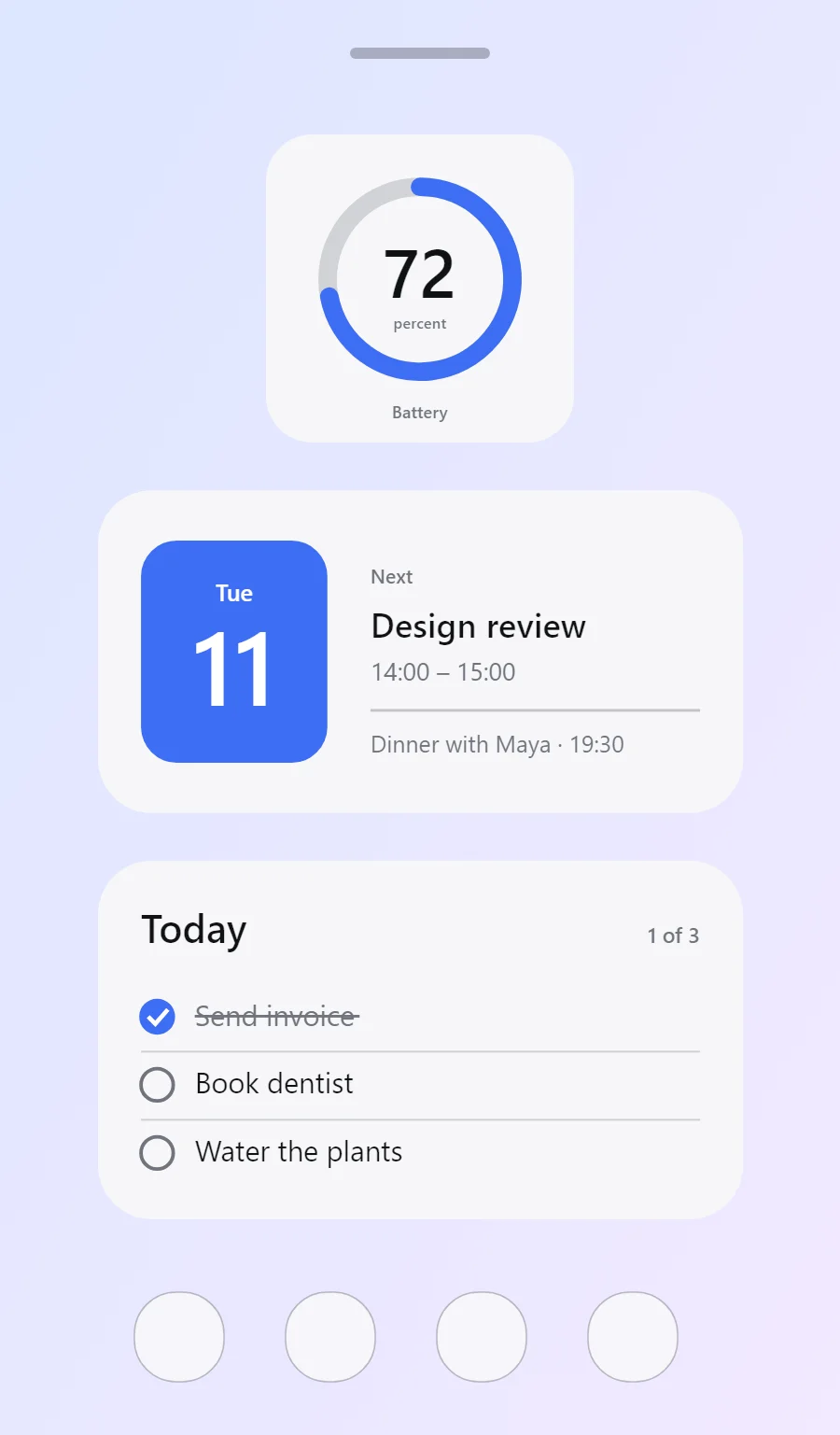
The three One UI-style widgets
- One UI-style battery widget (2 × 2): shows your charge level as a ring with the percentage in the middle.
- One UI-style calendar widget (4 × 2): shows today's date beside your next event.
- One UI-style to-do list widget (4 × 2): keeps today's tasks on your home screen with boxes you can tick.
Place them top to bottom in that order and leave the row above the dock empty so the wallpaper has room.
Battery widget settings
A battery widget turns one number into a shape you can read without thinking. A ring that fills clockwise is the clearest form, with the percentage inside it.
- Canvas: 200 × 200, background #F7F7F9, corner radius 30
- Ring: diameter 120, stroke 12, track #70747D at 28% opacity, progress #3E6EF5, round ends, start at top
- Battery: level as a number, built-in Sans, size 44, color #101114, centered in the ring
- Bars and rings: Use thick rounded bars in blue on a pale blue track.
Free to build. Full recipe and steps.
Calendar widget settings
A calendar widget answers two questions: what day is it, and what is next. The date sits in a bold block on the left and the next event takes the right side.
- Canvas: 360 × 180, background #F7F7F9, corner radius 30
- Shape: date block 104 × 124, radius 20, fill #3E6EF5
- Date: weekday (size 13) and day number (size 58) centered on the block, color #FFFFFF
- Numbers: Keep numbers bold and dark with a blue unit or label.
Styling is free; the live data needs Pro. Full recipe and steps.
To-do list widget settings
A to-do widget works when it is short. Three tasks, a clear title and a box to tap are enough; a long list belongs in an app.
- Canvas: 360 × 200, background #F7F7F9, corner radius 30
- Text: title "Today", built-in Sans, size 22, color #101114
- Text: count such as "1 of 3", size 12, color #70747D, right aligned
- Lists: Give rows tall spacing and a round blue checkbox.
Free to build. Full recipe and steps.
How to set up a One UI-style home screen
- Set the wallpaper first, so you can judge every color against it.
- Build the battery widget and add it to the home screen at 2 × 2.
- Duplicate its canvas settings for the calendar and to-do list widgets so the background, radius and outline match exactly.
- Place all three, then adjust margins until the left edges line up.
- Change the icons last, and remove any app you do not use daily from the page.
One UI-style wallpaper ideas
A soft abstract gradient in blue or lilac.
One UI-style icons and dock
Rounded-square icons; on Galaxy phones the default shape already matches.
One UI-style home screen colors
- Cloud
#F7F7F9Background - Card blue
#E9ECF5Surface and tracks - Near black
#101114Text - Slate
#70747DLabels - Galaxy blue
#3E6EF5Accent
Fonts for a One UI-style home screen
Use built-in Sans at weight 600. Corner radius is 30 on every widget so the shapes match.
Do and avoid
- Use radius 28 to 32 so the widget matches Samsung cards.
- Keep text large; this style favours reachability.
- Do not use thin fonts.
- Do not crowd more than three items into a small card.